
SolvedHow-toUpdated

MECCHA CHAMELEON: All Maps Collection (Discontinued)

Short answer

Subscribe to every working map with one click.

Steam Community guide by Mnae.

Intro

Nah, I give up. I have my finals and I can't sub or test all good maps. I initially made this for my friends, so it doesn't really matter. +who wants to download 60-70 GB of maps..
Want to skip manually subscribing to every map and avoid downloading broken ones?
(why does this sound like an ad TwT)
actually pls don't do this unless you have lots of storage, I'm trying to remove maps that take a lot of storage too. It was at 43GB, I removed some to get to 30GB. Will remove more when I'm free! (ofc the ones that are actually buggy)

One-Click Subscribe

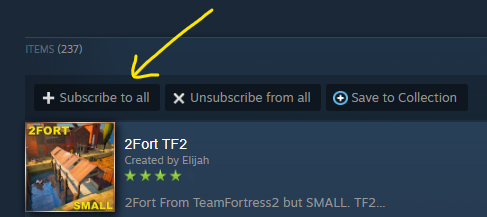
Click Subscribe to all in the collection below to subscribe to every working map at once.
https://steamcommunity.com/sharedfiles/filedetails/?id=3748610300

Screenshot


updated daily, do gimme a thumbs up if ish useful hehe <3
Did this work for you?

More for MECCHA CHAMELEON

All MECCHA CHAMELEON guides →

SolvedHow-to

How to Import a Map from Gmod/Source Engine

A tutorial focused on importing a map from gmod, can also be applied to other source engine games. Mostly focused on troubleshooting the issues that come with doing this, but gives a general rundown on how to go through the process as well.

#performance#save#mods#quest

SolvedHow-to

How to Create a Custom Map

Please refer to the following document for instructions on how to make it. Documents[docs.google.com]

SolvedHow-to

Invert Mouse Y-Axis Guide

Simple guide to invert mouse y-axis until the developers add a setting for it.

#save#mods

SolvedHow-to

MECCHA CHAMELEON Paint Blending Guide

Step 1: Find the Hex sRGB Code When you are in Paint Mode, look for the small box labelled: "Hex sRGB" To the right of this box, you will see a colour code. The default starting code is: "FFFFFFFF" When you select a colour, this code will change into a new string of numbers and letters. Step 2…