 Day One Fixes
SolvedFixUpdated
Marvel Rivals Performance Guide/FPS Boost [UPDATED]
Short answer
FPS Guide to help you achieve a smoother gameplay experience. (Includes INI tweaks)
Steam Community guide by RWND.
Introduction
I’ve tested the changes listed below, and all of them have provided a noticeable FPS boost, some more than others. With these optimizations, even a 1050 Ti can achieve 70-80 FPS. I’m confident you’ll find this guide helpful!
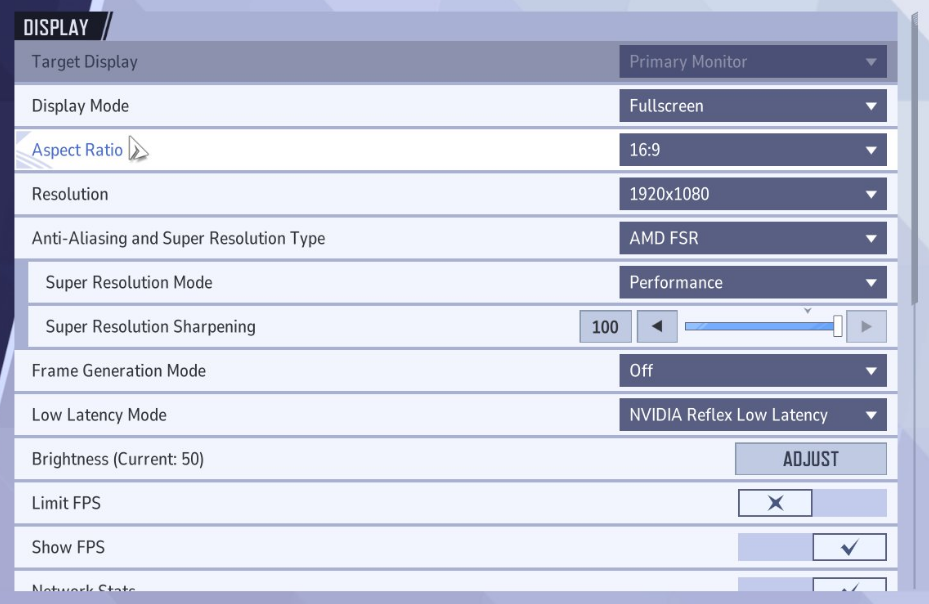
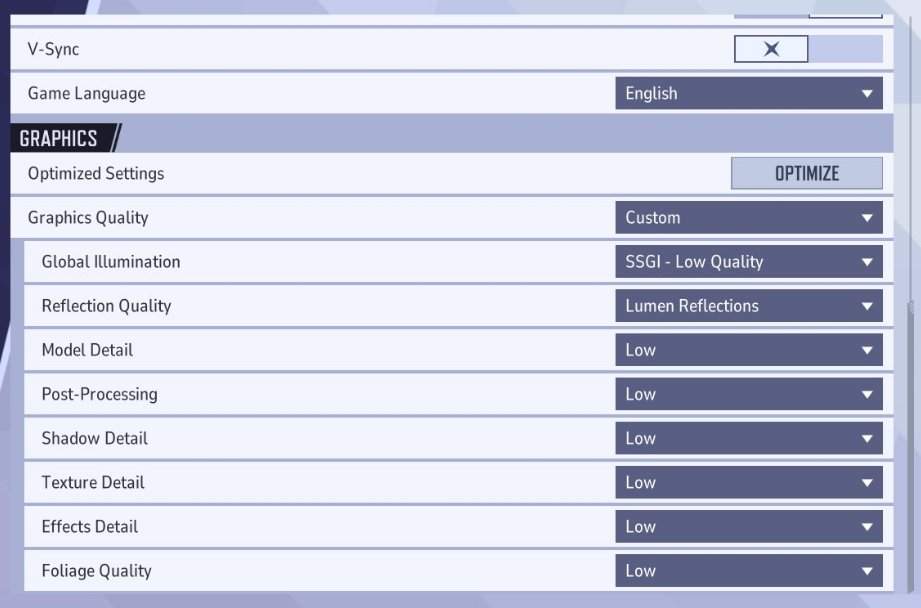
1) In-game settings
NOTE: The settings below, are also the best ones you can use for a competitive advantage. (Except the TAAU change)
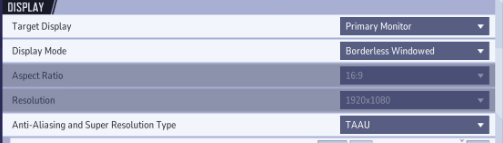
You can also try changing the "Anti-Aliasing and Super Resolution Type" to "TAAU" and set the Render Scaling to 50-60%. This WILL make your game look worse but it will give you extra frames.
2) INI Tweaks
THE .INI CONFIGS BELOW DO WORK, BUT USE IT AT YOUR OWN DISCRETION! SO FAR NO ONE HAS GOTTEN PUNISHED FOR IT.
- Navigate to the config folder located in:
"C:\Users\YOURNAME\AppData\Local\Marvel\Saved\Config\Windows" - Create a file named "GameUserSettings.ini" and paste the following:
GameUserSettings.ini (Clickable)[pastebin.com] - Now, create another file named "Scalability.ini" and paste the following:
Scalability.ini (Clickable)[pastebin.com] - Don't forget to save the files! (if nothing changed, make sure it's a .ini file and not a .txt file)
This will make the game look worse, but it should give you a nice FPS boost.
3) Disable Mouse Smoothing
To disable mouse smoothing, create a file named "Input.ini" in the same folder and paste the following:
[/script/engine.inputsettings]
bEnableMouseSmoothing=False
bViewAccelerationEnabled=False
bDisableMouseAcceleration=False
RawMouseInputEnabled=1
4) More stuff
Here's a a collection of potential FPS boosts & stutter fixes:
• INSTALL THE GAME ON A SSD!
• Disable any overlays you have running (Steam, Nvidia/AMD, Discord etc)
• Install the latest NVIDIA[www.nvidia.com] - AMD [www.amd.com]drivers. Both AMD and Nvidia recently released drivers that provide game support for Marvel Rivals.
• Close your browser while playing, especially if you have less than 32GB of RAM.
• In the NVIDIA Control Panel:
- Set Low Latency to On and V-Sync to Fast to reduce mouse lag, weird smoothing, and input delay. This has a massive impact on gameplay, especially for input responsiveness.
- Increase Shader Cache Size to something like 100GB to improve load times and shader compilation performance.
• Increase your pagefile if you have 16GB of RAM. This can help when you run out of RAM and experience stuttering or crashes. It uses SSD space as virtual memory, which is slower than physical RAM but still effective. Just avoid doing this on HDDs: Nolvus Pagefile Guide[www.nolvus.net].
• Check if XMP is enabled in your BIOS to ensure your RAM is running at the optimal speed.
• The game may have a memory leak. Restarting the game every few hours can help mitigate performance degradation over time.
End
If you come across any errors in the guide or have additional tips that can enhance performance, please feel free to share them in the comments!
Hopefully, this guide has assisted you in making the game, at the very least, more playable.