 Day One Fixes
SolvedFixUpdated
Skyrim SE Troubleshooting, Crash Fixes, and Essential Resources
Short answer
Most critical crashing issues and mod breaking bugs in Skyrim Special Edition can be resolved using community troubleshooting threads, event viewer logs, and patching tools like USSEP.
Troubleshooting and Crash Resolution Thread Good place to start
The problem
Last Updated: May 24, 2021 - Game crashing every 15 minutes bug - How to use Event Viewer (Absolutely important to know, it's in the second post) IntroductionPLEASE READ THIS WHOLE POST! 99% of ALL CRITICAL ISSUES CAN NOW BE RESOLVED WITH THIS LIST And don't add me to steam for troubleshooting help, I don't accept random invites. Hello everyone! I hope you are enjoying your copy of Skyrim Special Edition, if not, this thread is for you.This thread is dedicated to help resolving critical game-breaking issues that may occur while playing or attempting to play the game. This comprehensive list of fixes took a considerable amount of time to compose and I'd like to thank everyone who's helped contribute to it (you have been tagged accordingly). If you don't see a solution that works for you in this post, consider searching through the topic using the search bar found on the right --> If you have a problem that is not listed here, please be sure to include the copy+paste response to help us diagnose your situation as knowing more about your setup will be very helpful. You can find this information at the bottom of this post (not thread). Please note that this thread is reserved for critical game-breaking bugs in other words bugs that make you unable to play the game. If you have a list of mods, consider creating your own thread as this thread is for vanilla (mod-free) skyrim. Thank you, and good luck! May Talos be with you. General Fix GuideThe first reply to this post contains a general repair guide. You can start there and then come back here for very specific problems. If you have modsThe instructions here are for "vanilla" Skyrim SE, meaning there are no mods installed. The intention here is to help people play the game when there's a critical issue. Please search / create your own thread if you have installed mods and it's not working. Thank you for understranding! PremiliariesPlease make sure that before anything, you have both windows and your drivers updated!…
Eriane, original post
What players suggest
UPDATED 5/24/2021 Alright, so I created a more TL;DR version which doesn't go into every major issue but it does cover the basis to get the game running. Any time you experience serious problems with your games, you need to consider the following: 1. What useless programs are running?Go through all the running tasks and familiarize yourself with them by googling the process name like explorer.exe and see what's running it. If it's not important, uninstall it. If you're not sure, keep note on what the application is and re-install it later. You don't need a audio control panel, or network control panel etc... i would recommend to keep your AMD/NVIDIA control panels though. Mind you that factory built computers that you buy from Best Buy are filled with malware / junk software, get rid of all of it. 2. What useless programs are running on startup?Whether you have a virus or not, knowing what is booted when you turn on the computer is important. There are three spots for this, technically. 1. The startup Registry which can be found by typing 'msconfig' by using the run dialog (windows key + r) but this was replaced by the task manager in windows 10, so you have to do a Alt+ctrl+del and go to startup. Disable everything that you don't care to see booted. Auto updates, adobe, etc... None of that is needed. 2. There is a start menu item called Startup or something like that. I'm on my mac right now so the name escapes me. Delete any shortcuts found there. 3. The third method uses windows events, I won't explain this because it's a very advanced concept. 3. Do I have multiple Antivirus / Malware scanners?You don't need Norton or any other third party antivirus scanner. Why? Because your computer already has one called Microsoft Defender. Running two or more A/V at once will basically make them not work well. Get rid of Norton and stuff, they are not needed and why spend money on something that acts as spyware anyway? Second thing to consider is disabling your antivirus…
Eriane
Congrats ... a sea of clam in all this insanity
Black Album
Skyrim SE won't start! Ye but what's if evry game work great but skyrim get bugged on :api ms win crt convert l1 1 0.dll
Ice Axe
I'm not sure I understand what you mean. Also as an update: Added 2 new solutions.
Eriane
Finally, an important thread!
Ghostpro71
Hey Hedgie. I too was unable to even launch the game. I tried solution one you posted but that one didnt work for me. I tried a few others as well with no luck. The solution for me was to manually install a windows update that I didn't have directly from microsoft https://support.microsoft.com/en-us/kb/2999226 You need to pick the right version for your operating system. I'm using x64 Win 7. But this was my solution anyhow.
messlinger76
Okay I updated the answer. For your question. Had to do a little bit of googling. Funny thing is that I had JUST edited my answer. I will add your link in there as well since your link is better.
Eriane
I think alot of these crashes are due to the Vredist install needing a system reboot in order to complete. They have bundled a Vredist install with this game that steam tries to install the first time you fire up the launcher. When I dug into my launch issues further I noticed that the 64bit Vredist was complaining about needing a reboot. This error is not visible to the user.
BigDally
Thank you! I have added your solution to the list. :)
Eriane
i get error 0xc000007b
necronight
Unofficial Skyrim Special Edition Patch (USSEP)
The problem
https://steamcommunity.com/sharedfiles/filedetails/?id=2909719179
smr1957, original post
What players suggest
Skyrim is a great game ... that's why you bought it... The problem is that it is filled with 1000's of little bugs and mistakes. That's Bethesda's fault for releasing it in that state and never coming back to fix it. If you play long enough you'll encounter many of them and have no idea how to fix them. You may already have found one. So what do you do ??? Luckily for you ... there's a wonderful team out there who's life's work appears to be fixing these bugs for you ... so you can enjoy the game even more. There are some luddites out there who will tell you not to use it because it fixes an exploit they used to cheat whilst playing. That is their choice ... if they want to cheat there's no way to change their mind. But you have a choice ... do you install this wonderful mod that fixes so many things that are well above your paygrade and that, frankly, you'd be a fool to ignore ... or do you follow the advice of fools and decide not to install it ... it's that simple. Edit: Much later in this thread .. after a few arguments .... someone else sums the issue up far better than I ... I'll quote it here now.
Black Album
I agree completely the unofficial patch solves so many bugs that I can't play without it.
SpeedFreak1972
I agree as well. The individuals who made the unofficial patches really know what they are doing, and are the real experts.
BarbarianHeart
As a mod, the Unofficial Patch is somewhat unique in the sense that you probably don't notice it working. You're only able to notice when you DON'T have it and things go wrong in your game. I played many playthroughs without the mod before I found out about it, and I ran into a multitude of bugs which made me restart or resort to console commands. I also ran into many things which I simply wrote off as silly game design, and only when I read the fix list of the Unofficial Patch did I think "Oh, that was actually a bug! Makes sense!" After I installed the mod, I never went back. To me it's essential. It makes the playthrough much smoother, with much less problems. With much less need to accomodate to gamebreakers and sillyness (except the things which remain beyond the scope of the Patch, of course). You can just play.
Trehek
If you need to use console commands to continue a game, it's already broken :(
Surfblasted
indeed and probably with the unofficial patch you would never ever encounter those bugs and wouldn't have to resort to console commands.
SpeedFreak1972
Is someone actually still recommending console commands as general bug fixes, despite the threat of bypassing quest triggers and messing up with alias checks? We had this conversation about 7 years ago. Skyrim SE didn't stop being a Creation Engine game in between. Don't mess with console, unless UESPWiki lists command as potential solution, which marks it safe(ish) to use in that situation. I recommend using the Unofficial Skyrim Special Edition Patch. Console commands can not prevent fun things like: In-game(!) save bloat from uncleared faction quests. Yes, you can potentially wreck the save just playing unmodded game. Rare, but plausible. Messed up aliases. 95% of reasons why some NPC is messing around. About 100% of second wave posts saying "I fixed (so to speak) one thing with console, but now these things are broken" happen, because people tried to fix these things with console. Broken AI calls. You can move someone there with your console, but you can't force them to continue the quest. Changing quest stage with console risks bypassing quest triggers again. Script loops. These things are something that BGS should have dealt with themselves. How exactly is someone going to fix them with console? DragonActorScript. I wouldn't actually need to continue this list after that note. In fact, I could have just mention this and leave it here as sole reason to use the patch. Extra: Esbern. Even patch can't fix Esber, but it doesn't stop people from trying to bypass the problem with console. Then they return telling how messed up the Blades part of MQ is. If official patch (released long time ago and merged to both Skyrim LE and SE releases) isn't working, then redo the INI-file and stop breaking things further with console. That is just a very, very small take of things patch fixes, or why console isn't a good idea. I tried to pick ones that most people reading the thread would understand outright from the reply. Whole version history was posted above.
Ilja
the funny thing is I never encountered those bugs in the first place due to the unofficial patch .... so I don't have to use console commands.
SpeedFreak1972
The list of fixes speak for themselves: Click here [afkmods.iguanadons.net] to see for yourself. I warn you though, it's gargantuan. Fixing the alias problems was one of the many great things about it. The creators and all who've contributed have gone far above and beyond fixing the many issues that plagued skyrim. Having played with this patch for so long I could never go back. Nope.
Ondjage
No one is interested of your game. You can do what ever you like with that. Install horny Khajiits, if you like. No one cares. Bugs are properly documented. You are talking about your personal perfectnesses, without providing any care to potential issues for others. You are not even talking of same thing what we are talking about. I didn't mention save corruption with a single word in my reply. Save corruption another matter. It will not cause alias issues, AI problems or even crashing. Corrupted save simply fails to load. You know that it is corrupted, when game especially mentions that your save file is corrupted and will not be loaded. We would all be super chilled and enjoying our games, if bugs were persistent. That would make them easy to fix. Most issues as are conditional and based on problems building up. Let's speak about the save bloat, which you brought back as example. - Companion quests are not cleared properly. Game causes bloat each time you visit Whiterun. You do not need to visit the mead hall at all. - Turned down quests from Vex are not cleared. - Picked up Nirnroot entries are not cleared. - College of Winterhold radiant quest entries are not correctly cleared. Faction quest line choices can cause save bloat in your game. That is a fact. You haven't experienced them? Once again: no one cares. You do not see the problem, if your gameplay choices do not build up the problem. That does not mean they wouldn't be there for other players. It is you who are robbing their choices to play the game as they like. You are limiting other people playing style with your attitude toward exploits, which can be added in better form and usability by anyone knowing how to open xEdit.
Ilja
Old Farts' Coffee House
The problem
https://steamcommunity.com/sharedfiles/filedetails/?id=2248436202 A fully licensed franchise of Ilja's Forum Works Ltd. (all rights reserved) If you're new to Skyrim, or just having problems, and not sure where to begin ... Just ask. All are welcome, If you can grow pubic hair you're already an old fart to someone. This is just a place to hang, chat, ask questions, and get abused by forum regulars. Feel free to drop by ... We might not have all the answers, but we probably already know the people that do, and we will be happy to help. Bashing, spamming, self promoting, advertising, and trolling will simply provide us with target practice and make you look really lame. Please leave politics and religion at the door as well. Personal attacks against forum guests based on country, race, ethnicity, and lifestyle preferences will not be tolerated in any way ... Period, and we will be enforcing the moderators rules around here ... Period Keep it clean (mostly) While the game is listed as mature, a lot of the people aren't Keep it civil (always) arguing a little is fine, just keep it friendly Move over young ones ... Gramps moved back in.
Avrie, original post
What players suggest
Helpful Information!Information on the game pass version of SSE-MS https://steamcommunity.com/app/489830/discussions/0/5168416410405391794/ Skyrim SE: Guides and Resources https://steamcommunity.com/app/489830/discussions/0/340412122413706606/ Helpful Links and References https://steamcommunity.com/app/489830/discussions/0/2828702372997628701/ Tome of xEdit https://tes5edit.github.io/docs/ CK Good Practices https://steamcommunity.com/sharedfiles/filedetails/?id=2630418469 Community That’s why this thread is here. Either you already love the game, and you’re rediscovering it all over again, or you’re just discovering it now for the first time, or you own a console and you’re just discovering modding … or you just plain got suckered into spending the money ... Whatever brought you to Skyrim and here to the forums, the one thing that was missing was a place where you don’t need an excuse to just kick off the boot’s pull up a chair and ask a question, tell a story, and get help if you need it. Ilja owns the inn, I just manage the room, but it’s my room my rules, so behave or you won’t be invited back for coffee and biscuits. He runs the coffee room over on the LE side. (usually … lately he’s been in Minion land beating up witches and creapers, but promises to return when his house is done... if he doesn't get lost ;-) Now community isn’t just about feeling welcome. It’s also about helping each other. My friends and I have been working on making a series of new basic configuration guides for SSE. Are they better than a gopher video? … heck no, are they flashy and well-made like a Gamer Poets video? ahhh … nope, not even close! In fact they're not videos at all. Just simple guides. But what makes them worth a look is the fact that they are community supported, and you can always come here and ask for help if you have any problems... And if you do have any problems, we’ll help you sort it out, and then update the guides. Now you’re helping others with the same issues…
Avrie
Coming Soon ... Old Farts Guides Redux ... please pardon the mess while we renovate! Yeah and I'm lying. I started writing a new series of SSE guides, but I'm outside working in the desert heat all day and I just haven't had the energy. I need down time to do this right, and with this Covid thing I may get my wish. http://steamcommunity.com/sharedfiles/filedetails/?id=850511347 http://steamcommunity.com/sharedfiles/filedetails/?id=866820805 WIP ... Book 3 was scrapped, Book 2 is going to get a full overhaul very soon. (changing the focus back to techniques, not specific mods ... might take a while) SSE Guides https://steamcommunity.com/sharedfiles/filedetails/?id=929828423 http://steamcommunity.com/sharedfiles/filedetails/?id=1197413219 http://steamcommunity.com/sharedfiles/filedetails/?id=789781658 Note - The WB team is close to a full release version of 307. Guides that cover both games http://steamcommunity.com/sharedfiles/filedetails/?id=818230170 Important - As of the release of SSEEdit 3.2 a few more steps have been added to the cleaning guide. Please review if it's been a while since you cleaned. LE Guides http://steamcommunity.com/sharedfiles/filedetails/?id=865156803 http://steamcommunity.com/sharedfiles/filedetails/?id=653119731 http://steamcommunity.com/sharedfiles/filedetails/?id=815662314 Same information as the full guide without sections on presets http://steamcommunity.com/sharedfiles/filedetails/?id=818155665 http://steamcommunity.com/sharedfiles/filedetails/?id=839312113 The SKSE guide got a face lift. I simplified the instructions which also makes it compatable for advanced installation with WB or MO as well as (EOL) NMM Other Game Guides http://steamcommunity.com/sharedfiles/filedetails/?id=943456144 http://steamcommunity.com/sharedfiles/filedetails/?id=947769634 My edited SSE Ports https://drive.google.com/drive/folders/1eFIGdsBxCCMI4SApXeHOTaoZ8SOyo6m9?usp=sharing these are edited versions of my ports by request. They also may have required…
Avrie
Turning this post into a fanfic site for some of the regulars My current playthrough journal ... Avrie Lythe's Diary https://steamcommunity.com/app/489830/discussions/0/2788173147743563719/ Shielah's Tale - A skyrim account by Stormsong the Fallen https://steamcommunity.com/app/489830/discussions/0/1727575977527692678/ Rhiannon the Lost - a Skyrim tale by Surfblated https://steamcommunity.com/app/489830/discussions/0/1727575977529641630/ The Engineer's Tale & Volume One, The Curious Tale Of Valerion Appianus by Drwatson1873 https://archive.org/details/@drwatson1873 in case anyone wants to follow.
Avrie
Hallooooo bagsies the second best chair and a spot for a cuppa
gnewna
I'll reserve one too ... could be worth a fortune in years to come ...
Black Album
wanted something fun ... If you can't laugh at yourself :)
Avrie
Sent a message to DJ .... do we have a naughty step set up for him yet ??
Black Album
No naughty step, but the rack, and pillary are free, (there's a 2 Oclock for the pillary so tell him to get a move on)
Avrie
We may need an air-freshener too ... I've noticed when a lot of Old Farts get together ..... there's very often a new fart smell that arrives too ... I'm not pointing any fingers but it's something to be aware of.
Black Album
Just invited Ilja, but he's mining with the block heads again LOL. Hope he's not offended, I saved him the best seat @ BA, it was the dog, I swear ... F-in wearwolves
Avrie
Skyrim SE: Guides and Resources (23.12.2024)
The problem
23.12.2024 UNDER CONSTRUCTIONThis thread currently has old information and links. I am in the process of fixing it. Consider thread being worked upon, as far as this information remains visible. ---------- This post gathers community guides and tutorials under one page. We had a similar pinned topic called Player spreadsheet - Player and Modding Resources in Skyrim Steam discussions. This topic aims to grow similar with that. I will be adding tutorial posts, videos, guides and other information about how to mod the game, solve bugs and pass problems. Skyrim SE is a new release, so it will take some time for us to measure what is relevant for this version and gather it here. This post is a community effort. Contributions are welcome. Table of contents Game type Dealing with game updates Modding the game Load order basics and LOOT Skyrim Workshop Skyrim Nexus Bethesda Workshop (comments will close 2021) SKSE Mod Managers Tools Bugs and fixes Unofficial Skyrim Special Edition Patch Bug fixing mods Looking for help How to set file extensions visible? Mod scripts and save files Crashing online after December 2017 update CTD after Bethesda logo Esbern Voice Fix Papyrus logs Requesting help from the forum How to validate game files? Making Skyrim vanilla again Collected guides Links and resources Change log: in Reply #1 1. Game type Skyrim is a single player game, made by Bethesda Game Studios and released by Bethesda. The original game was released 2011. Remastered Skyrim Special Edition (Skyrim SE) will be released October 28th 2016. As a single player game, it is not under Valve Anti-Cheat System (VAC) observation. Modding the game from third party sites is allowed. Skyrim SE is a 64bit edition from Skyrim. It includes all three gameplay DLCs Dawnguard, Hearthfire and Dragonborn. Game does not have native multiplayer option. It also does not have a monthly charge. Game is free for all PC players, who already have the full game, Skyrim + 3 gameplay DLCs (Dawnguard…
Ilja, original post
What players suggest
Changes 23.12.2024 - Fixed: Link to WryeBash. Therad is now under construction, to be brought up to date again. 17.05.2021 - Added: Link and information about Bethesda closing their forum and direct mod comment support on BethNet 13.03.2021 - Added: Section 5; SKSE64 and Gamepass version of the game are not compatible with each other at this time, if ever. 10.06.2020 - Fixed: Obsolete entry from Table of Content. Full update will be coming this summer. 28.12.2019 - Fixed: USSEP Version history link had changed. Thank's for smr1957 from notification. - Fixed: Skyrim LE sister thread name to current one. - Added: Link to Community thread "About load order and resource priorities" 27.03.2019 - Updated the post and removed obsolete information 03.09.2018 - Added new section: Dealing with game updates and SKSE64 18.05.2018 - Added: HELPFUL LINKS AND REFERENCES by smr1957 14.04.2018 - Added Mod Organizer 2 | Official Series by GamerPoets 21.02.2018 - Added: Crashing online after December 2017 update 19.02.2018 - Fixed: MO2 version information and download link. Link was still pointing to Nexus redirect (RD). - Added: Vortex information, download link to Vortex and link to Gopher's tutorial videos. 09.01.2018 - Added: Gopher's tutorial video about SKSE64 25.12.2017 - Added: Link to Mod Organizer 2.1.0 - Updated: Mod Organizer 2 information 11.11.2017 - Updated: SKSE64 information. - Added: SKSE64 Installation Guide by Avrie. 12.09.2017 - Updated: SKSE64 information. 01.08.2017 - Fixed: Wrong link and broken link. 17.01.2017 - Added: Direct link to change log in reply #1 - Changed: Small list of little big mods to [SSE] Recommended fixes and adjustments - Added Link to [Community] SKSE64 news thread. 13.12.2016 - Changed: Added SSE version about verifying integrity of game cache. Replaced the old LE version from the guide. 06.11.2016 - Updated: LOOT information. LOOT now detects Skyrim SE. 31.10.2016 - Updated from old: Resetting SkyrimSE to Vanilla or A Clean Reinstall…
Ilja
good work Ilja, now if they will only read it.
jancawa55
Player spreadsheet was originally just that: a link that we spread around Skyrim forum. Peoples will read it, when it get posted and updated. I expect to update this a lot, when modding tools and sites are getting new updates.
Ilja
Player spreadsheet was originally just that: a link that we spread around Skyrim forum. Peoples will read it, when it get posted and updated. I expect to update this a lot, when modding tools and sites are getting new updates. I'm with Avrie on the "Player Spreadsheet" because many associated "spreadsheet" with "Excel" or accounting/math and it just turns their bright lights OFF. Tough enough to get the darlings to google or even read pinned threads without the TITLE quenching their thirst for knowledge.
MageThis
Sorry, same with your "Remastered" thread. If they do bother to look many miss it due to no "SE" in title (or Special Edition) as you so clearly have in this excellent thread.
MageThis
Yeah. I tried to use here what I learned from my past mistakes. Claiming the reply #1 was one of those things.
Ilja
What is this? I thought all DLCs were merged with the main game and they were no longer using BSAs?
Sand
I don't have access to release. This is what I gathered from discussion in Discord, when I prepared the SE release of my original post in Skyrim forum. According our discussion, DLC data files were untouched and most changes were made to binaries. Do you have a source for that? Something I missed? What comes to BSAs, they are still being used. The current form is BSA2, but I do not yet know if this will be the case in Skyrim SE. In any case, mod authors will be using BSAs, in what ever form. Creation Kit does not handle resources and distributing all as loose files would be a horrible mess.
Ilja
I don't have access to release. This is what I gathered from discussion in Discord, when I prepared the SE release of my original post in Skyrim forum. According our discussion, DLC data files were untouched and most changes were made to binaries. Do you have a source for that? Something I missed? What comes to BSAs, they are still being used. The current form is BSA2, but I do not yet know if this will be the case in Skyrim SE. In any case, mod authors will be using BSAs, in what ever form. Creation Kit does not handle resources and distributing all as loose files would be a horrible mess. You're right, I misread a post! It's only the BSAs that are combined. I'm so disappointed now! They really should have combined them to improve stability and just have a cleaner game.
Sand
That would result in the FormIDs changing and breaking litterally EVERY mod that uses the DLCs at all resulting in them likely having to be remade from scratch. Also merging the DLCs together won't help with stability if the DLCs still have bugs, similarly to the way that merging mod files together won't make them more stable if they have bugs individually.
Nazenn
Helpful Links And References
The problem
https://steamcommunity.com/sharedfiles/filedetails/?id=2161237390 Listings of discussions and guides that I find useful to refer to when helping others on the forum - but which are of help even if the only one you are helping is yourself. CURRENT SKYRIM SPECIAL EDITION BUILD, CURRENT STATUS OF SKSE64 and which version to use with the current build, as well as a TABLE OF CONTENTS, are posted in the Helpful Links and References - All in One guide. https://steamcommunity.com/sharedfiles/filedetails/?id=2888888400 And the individual sections: https://steamcommunity.com/sharedfiles/filedetails/?id=2880736526 https://steamcommunity.com/sharedfiles/filedetails/?id=2882241414 https://steamcommunity.com/sharedfiles/filedetails/?id=2882866141 https://steamcommunity.com/sharedfiles/filedetails/?id=2882867968 https://steamcommunity.com/sharedfiles/filedetails/?id=2882868252 https://steamcommunity.com/sharedfiles/filedetails/?id=2882871440 https://steamcommunity.com/sharedfiles/filedetails/?id=2882875079 https://steamcommunity.com/sharedfiles/filedetails/?id=2898569762 TABLE OF CONTENTS is posted in the Helpful Links and References - All in One guide.
smr1957, original post
What players suggest
Regarding IMPORTANT NOTE: Why we can't help with a pirated Game: "You do not have official version of the game and you can't use proper unofficial patches to fix issues from the game. We can't parse your game, due to it not being a legal version that could be validated from the server. We can't give any reliable recommendations to fixes either, due to your game not using up to date and intact executable. At the top of that, anyone helping you would risk getting banned from the forum by supporting a pirated game. I can't see how anyone could help you here." Ilja http://steamcommunity.com/app/72850/discussions/0/846956740639650936/?ctp=81#c1488861734119106802 AND "Moddrop" is stealing intellectual property from many authors, and violating their rights. The fact that they have the pockets to bribe well known people into supporting them does not fool anyone around here. While we have always offered assistance to anyone who has asked, we will not support anyone installing stolen property through Moddrop. Don't bother to ask.
smr1957
August 31, 2023 ADDED: One Drive Issues Fix https://steamcommunity.com/app/489830/discussions/0/2263565217515804221/ To Section 5 - General Troubleshooting (Generalized Help sub-section) May 30, 2023 ADDED: A better explanation of SSE vs. AE: ("Or, for an even better explanation, there is this:" - https://steamcommunity.com/app/489830/discussions/0/3834298194196400899/?tscn=1685472389#c3834298194199977510 ) To Introduction (Current Game Version and Basic Information sub-section) February 19, 2023 ADDED: Advice to New Players Regarding Modding the Game https://steamcommunity.com/app/489830/discussions/0/3780246026239478835/ To Section 1 - General Information January 9, 2023 ADDED: Installing ENB & Requirements for Skyrim SE https://www.youtube.com/watch?v=1tfbuaNZmvE To Section 2 - Guides & Videos and Regarding Posting Your Load Order https://steamcommunity.com/app/489830/discussions/0/5239403117936375943/ To Section 5 - General Troubleshooting December 29, 2022 ADDED: Vlad 254 is now listed as a contributor to all the guides, so that should anything happen that makes me unable to maintain Helpful Links and References, he can take over maintenance of the Pinned Topic. December 7, 2022 REMOVED from Section 6, ADDED as own guide: Reliable Forum Regulars https://steamcommunity.com/sharedfiles/filedetails/?id=2898569762 November 15, 2022 ADDED: All in One guide. and: Modding on the Spectrum To Section 6 - Miscellaneous November 10. 2022 Helpful Links and References overhauled and a new guide based version posted. November 9, 2022 Changelog has been archived to here: https://steamcommunity.com/app/489830/discussions/0/2828702372997628701/?ctp=10#c5239403117923288503
smr1957
If ever there were a thread that deserved to be pinned. Thank you.
Chef
Then no one would read it.
smr1957
Then no one would read it. Hahaha so true.
bLaCkShAd0w
BUMP! Someone should just sticky this and require everyone to read it before posting on the Forum.
Mringasa
You're going to have a tough one there at the "read" part!
smr1957
Don't remind me. YouTube, the cause of the world's illiteracy and incompetence.
Mringasa
BUMPThis thread deserves a pin or a #1 spot.BumblesBounce
Bumping
Sinsling
Automatic downgrade to 4 earlier versions (Mulderland's Universal Downgrader)
Intro
In August 2026, Skyrim SE was updated once again, this time to version 1.7.99.
Updating a game is generally a good thing, but the problem is that every update can break mods and existing installations.
And while Bethesda could simply add a “beta branch” to the game’s properties, allowing mod users to easily choose which version they want to run, they just don’t seem to care...
So, just like I did for Fallout 4, I decided to create an easy and automatic way to downgrade your Skyrim SE installation.
Key features of this downgrader
This downgrader is called the "Mulderland's Universal Downgrader."
It works exclusively with the latest Steam version of the game (currently v1.7.104) and will be updated quickly whenever a new game update is released.
It can downgrade the game to 4 previous versions :
- v1.5.97, released in November 2019. An old version that I only recommend if you use an old modlist.
- v1.6.640, released in September 2022. A version still useful for multiple modlist.
- v1.6.1170, released in January 2024. This is the version immediately before the August 20, 2026 updaten and probably the version you want if the latest update has broken your installation.
- v1.7.97, release in August 20, 2026. (The version just before the hotfix of August 27, 2026)
Unlike other downgrader, and like my Fallout 4 downgrader, this one - works with** all games languages**
- doesn't require your Steam credentials
- behaves like a "team machine", making it very similar to manually downloading each depot in the steam console, except that the entire process is fully automated.
How To
It's very easy.
1) Get the latest installer
You can find it on my website:
https://www.mulderland.com/games/the-elder-scrolls-5-skyrim-special-edition
Click "Download".
Important: always use the latest installer, as I often rebuild them / add mirrors / change servers.
2) Run
Run the executable (no admin privileges required)
If you encounter any problems, check my help page: https://www.mulderland.com/help
- Now, you should see the welcome screen:
- Here click on the button and browse to your game directory, select SkyrimSE.exe
- The installer will check if your version is compatible:
WARNING: if your game language is English or Chinese, you will have an additional modal, as the installer can't decide which language you have.
In all cases, the installer will ask you to confirm the detected language. - Then, the component screen, you can choose which version you want to downgrade to:
You can also block future update if you want :)
Click next, wait a couple of minutes and it's done.
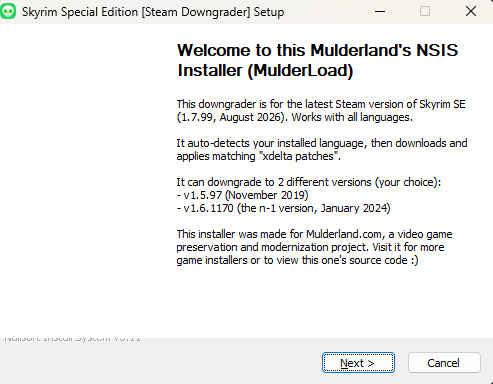
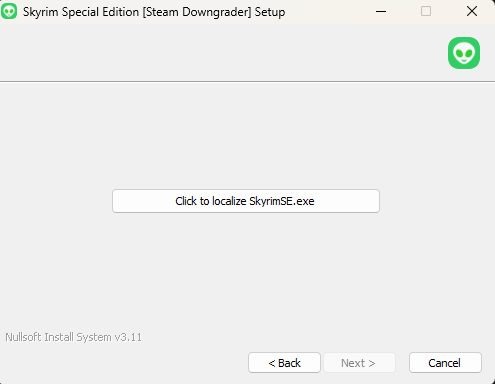
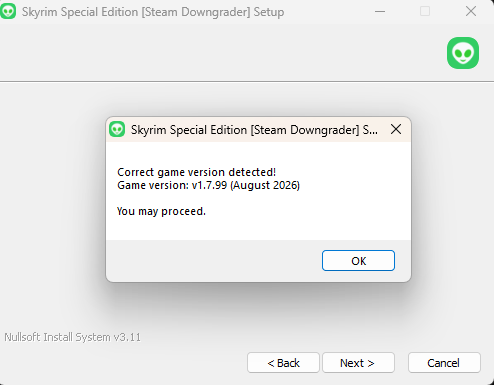
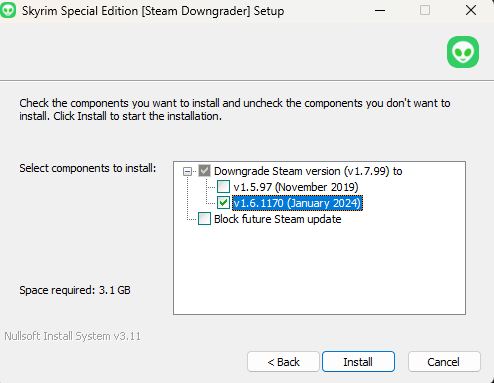
New screen in 26.08.12:
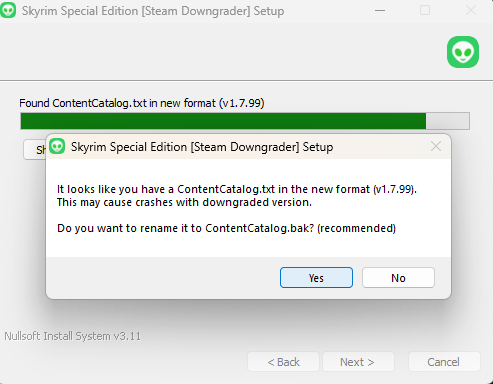
You may see that during the install, if you have a "ContentCatalog.txt" file in "%LOCALAPPDATA%\Skyrim Special Edition" that in the v1.7.99 format.
It is recommended to say Yes to avoid crashes.
Instead of deleting the file, the installer will rename it to "ContentCatalog.bak", just in case you need it one day.
FAQ & Troubleshoot
The downgrader refuses to run
This might be related to the Mark of the Web or the self-signed certificate.
Visit https://www.mulderland.com/help for more details.
I have a "disk write error" after using "Block future Steam updates"
If you check this checkbox, it will mark the file "appmanifest_377160.acf" as read-only.
This prevents Steam from making changes to your installation (which is what we want), but not in all situations. For example, you may want to:
- Install a DLC that is currently not installed
- Change the game language
- Return to the current version of the game
To revert the effect of this checkbox : - Locate the "appmanifest_489830.acf" file.
- Right click on the file > properties > uncheck "readonly" > OK.
- Finally, click Retry in Steam.
Tip: folder starting with a dot are invisible, but if you type their name in the input, then press Enter, you will enter it.
How to go back to the latest version ?
- If you block steam update, see previous point
- Then, just use the "steam integrity check" feature.
How to use it on Steam Deck or Linux ?
It works on Steam Deck/Linux too. I don't know the exact steps since I don't own a Steam Deck, but you can try launching the installer .exe with Wine or ProtonTricks.
New versions of my installers/downgraders should now automatically detect your game folder, even on Linux/Steam Deck.
The only exception is if your game is installed on an external SD card or drive. In that case, the installer should still point you in the right direction (for example, Z:\run\media\deck).
How this downgrader was made?
- The installer is open source and built directly through GitHub Actions. On my website, you can access the source code. You can even build the installer yourself if you want (see the README in my github repository).
- The xdelta files were created using PowerShell scripts that I've shared here: https://github.com/mulderf0x/fallout-4-downgrader-maker
- I do, however, use a self-signed certificate for the installer (a real one is quite expensive), so false positives can sometimes occur. If you don't trust me, you can scan it with VirusTotal and you'll see that the result is 0 or close to 0. As mentioned previously, you can also compile it yourself.
Thanks
Thanks for reading this guide!
If it helped you, please consider leaving a rating! 😊
You could even buy me a coffee at https://ko-fi.com/mulderland if you like my work.
I’d really appreciate it!

Did this work for you?
Related topics: crash fixes