 Day One Fixes
SolvedHow-toUpdated
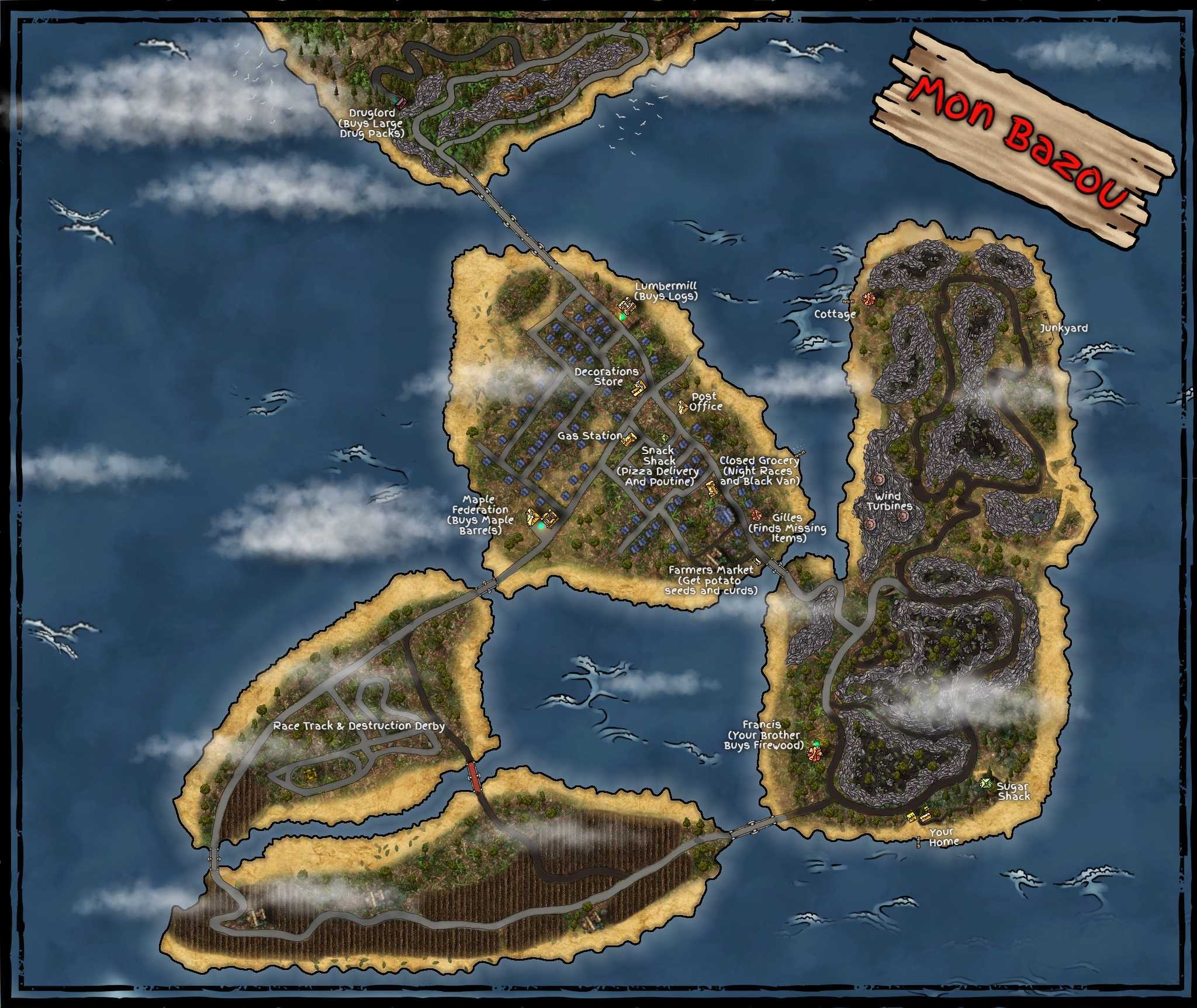
A Better Mon Bazou Map (Mod Details)
Short answer
Updated: 1/16/2024
Steam Community guide by Korgoth.
Mon Bazou
Wanted a better map, so decided to make one. Minimum Spoilers.
I used Inkarnate for those that want to know. Enjoy.
Just updated with the new map expansion.
Someone modded the map into the game. Below are the directions to get it to work for those that are interested. Just tested it and its spectacular.
Steps to Import Map into Game
- Download BEPINEX 5 (This is a universal plugin loader for Unity games which allows you to import your own map to look at using .png files. Make sure you are using the right version. The link below is for windows x64)
https://github.com/BepInEx/BepInEx/releases/download/v5.4.19/BepInEx_x64_5.4.19.0.zip - Locate your Mon Bazou game files (right click Mon Bazou, click properties, click installed files, click browse)
- Place the unzipped files directly into Mon Bazou’s main folder with the .exe file.
- Start the game and than close it. Need only go to menu. (This will create a new folder called "BeplnEx")
- Download the mod "Custom Maps"
https://www.nexusmods.com/monbazou/mods/115?tab=files - Place the "Custom Maps" files into the plugins folder located in the new "BeplnEx" folder.
- Download the mod "Better Map with Phone Number Note"
https://www.nexusmods.com/monbazou/mods/184?tab=posts - Replace the folder called "CustomMap" now in the plugins folder.
- Start the game all the way. Bring up your map. Hit Esc, press F4 and click the png file. press F4 to close the popup.
- Enjoy.
(Hopefully my directions are clear enough!)