 Day One Fixes
SolvedHow-toUpdated
Euro Truck Simulator 2: ETS2 Realism Done Right – The All-in-One Guide
Short answer
Best ETS2 Realism Settings (2025 Update) – This guide covers force feedback tuning (G29, Thrustmaster, Fanatec), realistic physics settings, no-mod configs, TruckersMP simulation rules, graphics tweaks, and career mode setups. Built for immersive sim-style trucking. Updated for version 1.55+. If…
Steam Community guide by Axiata.
Intro – Why Realism?
Mods are cool and all - I use them myself sometimes in single player. But the truth is, they’re not always stable and honestly not needed if you just want a setup that works every time you launch the game. ETS2 on its own already has enough realism to give you that grounded, immersive trucking vibe.
This guide is for both solo players and TruckersMP drivers who want to keep things clean, immersive, and focused on proper sim-style driving without having to deal with mod crashes or waiting for updates to catch up.

Best DLCs for Immersion (Optional)
These DLC's are completely optional, but! IF you want to get the most out of ETS2 without buying every single expansion? Here’s a list of the most useful and immersive DLCs that improve realism, map variety, and cab life. Whether you're playing single-player or TruckersMP.
Map Expansions:
These expand your world with real highways, cities, industries, and border crossings. Here’s what’s worth buying - in the best order for new and returning players.
- West Balkans – Dense, narrow roads and the best visual quality. Top pick for realism.
- Iberia – Long highway hauls, big delivery zones, and clean scenery.
- Road to the Black Sea – Adds Romania, Bulgaria, and Turkey. Diverse terrain.
- Beyond the Baltic Sea – Eastern Europe focus with authentic truck stops.
- Going East! – Expands Poland, Slovakia, and Hungary. Older but still solid.
- Greece – Coastal cities, island ferries, and mountain drives.Tip: Buy DLCs that connect together (Going East → Baltic → Balkans) for smoother route planning. See below.
Connected route:
Base Game → Going East → Road to the Black Sea → West Balkans → Greece
Optional add-ons:
Beyond the Baltic Sea (north), Iberia (west, via France), Nordic Horizons (upcoming north)
Upcoming Map DLCs:
These upcoming expansions that will add depth and variety to the game, They're not required, but they’re worth wishlist-ing if you land mass to cover while your trucking.
- Heart of Russia – Explore central Russia including Moscow, Volga and Oka rivers, old towns, and deep forests. Long haul heaven. (Coming soon)
- Iceland – Drive the scenic Ring Road (Hringvegur) through volcanic fields, glaciers, and raw nature. Sparse, dramatic, and very unique. (TBA)
- Coaches DLC – Swap your truck for licensed passenger buses like the Volvo 9700 DD or Scania Touring. Scheduled routes, passenger stops, and city-to-city gameplay. Best for experienced drivers. (TBA)
- Nordic Horizons – Major rework of Scandinavia with improved road quality, snow mechanics, seasonal effects, and new cities. A must-have for realism lovers. (Early 2026)
Industry & Cargo Packs:
These add realism by hauling actual heavy-duty loads and industry-specific cargo.
- Heavy Cargo Pack – Construction equipment, transformers, etc.
- High Power Cargo Pack – Large loads with upgraded trailers.
- Special Transport DLC – Oversized cargo, pilot cars, and custom routes (SP only).
Cabin & Truck Life Enhancers:
These make your cab feel alive - great for immersion.
- Cabin Accessories DLC – Add GPS, snacks, laptop, phone, hanging items, etc.
- Interior Packs (Renault, DAF, Scania, etc.) – More cabin details per brand.
- Wheel Tuning Pack – Custom tires, hubs, and rim styles.
Want to preview before you buy? Check out this Cabin Accessories DLC showcase and see it in action inside the cab.
Cosmetic Packs (Optional but Fun):
These don’t affect gameplay but offer solid visual upgrades.
- Paint Jobs Packs – National, racing, and custom liveries.
- Tuning Packs (Scania / Volvo / DAF) – Add bumpers, lights, and custom grills.
What Works in TruckersMP:
- All map DLCs are supported in multiplayer.
- Cabin Accessories and tuning parts are mostly visible (some only to you).
- Special Transport is single-player only, but great for immersive missions.
DLC's Supported by TruckersMP (Official): https://truckersmp.com/knowledge-base/article/103
Start with map and cargo DLCs first - they give the biggest boost to realism. Everything else builds on that foundation.
Graphics Setup (Low-End & High-End)
You don’t need to crank every setting to max to get a realistic experience in ETS2. The key is focusing on settings that add to immersion without sacrificing performance or making the game look too “gamey.” Here are two recommended setups based on your PC specs.
For High-End PCs (Ultra but Realistic)
If your rig can handle it, feel free to push most settings to ultra but keep them balanced so the game feels natural and clean. This will give you crisp visuals without going overboard.
list]
- Fullscreen Mode: Enabled
- Brightness: 50%
- Resolution: Native (1920x1080 or 1440p+)
- Refresh Rate: 144Hz+
- Vertical Synchronization: Disabled
- FPS Limit: 144–240
- FPS Limit in Background: 30 or 60
- Scaling: 400%
- Anti-Aliasing: SMAA + TAA
- TAA Tuning: Adaptive Clarity
- TAA Luma Sharpening: 1.00
- Texture Quality: High or Ultra
- Anisotropic Filtering: Max (16x)
- Normal Maps: Enabled
- Reflection Scaling: 100%
- Reflection Detail: High
- Mirror Quality: Ultra
- Mirror Resolution: Ultra
- Mirror Distance: Ultra
- Shadow Quality: Ultra
- Far Shadows: Enabled
- Interior Shadows: Enabled
- SSAO: High
- Light Visibility Ranges: High
- Traffic Headlights: Enabled
- Secondary Vehicle Lights: Enabled
- Depth of Field: Disabled
- Sunshafts: Enabled
- Vegetation Detail: Ultra
- Grass Density: High
- Weather Quality: Ultra
- Pedestrians: Enabled
This setup gives you a beautiful, clean view that feels like you’re truly sitting inside a cab, not watching a flashy cinematic.
For Low-End PCs (Budget but Still Immersive)
If your system struggles a bit, you can still achieve a solid immersive experience by lowering a few settings. This will help keep your frame rate smooth without sacrificing too much visual quality.
- Fullscreen Mode: Enabled
- Brightness: 50%
- Resolution: 1920x1080 (16:9)
- Refresh Rate: 144Hz
- Vertical Synchronization: Disabled
- FPS Limit: 400
- FPS Limit in Background: 400
- Scaling: 100%
- Anti-Aliasing: SMAA + TAA
- TAA Tuning: Adaptive Clarity
- TAA Luma Sharpening: 1.00
- Texture Quality: Low
- Anisotropic Filtering: 0x
- Normal Maps: Enabled
- Reflection Scaling: 50%
- Reflection Detail: Low
- Mirror Quality: Medium
- Mirror Resolution: Medium
- Mirror Distance: Ultra
- Shadow Quality: Very Low
- Far Shadows: Enabled
- Interior Shadows: Enabled
- SSAO: Disabled
- Light Visibility Ranges: High
- Traffic Headlights: Enabled
- Secondary Vehicle Lights: Enabled
- Depth of Field: Disabled
- Sunshafts: Disabled
- Vegetation Detail: Low
- Grass Density: Disabled
- Weather Quality: Low
- Pedestrians: Disabled
While it won’t look as sharp or detailed as the high-end setup, this configuration will keep ETS2 running smooth and maintain that immersive trucker vibe you want.
IF YOU HAVE A BETTER LOW END CONFIG, PLEASE COMMENT AND ILL ADD IN
Optional: Additional Visual Tweaks
For those comfortable with fine-tuning beyond the in-game menus, ETS2 allows some advanced tweaks by editing configuration files. These can adjust shadow sharpness, ambient occlusion strength, or texture detail more precisely. However, this is only recommended if you know what you’re doing and have backed up your files. Most players will get great results sticking to the in-game settings outlined above.
Config file location: Documents\Euro Truck Simulator 2\config.cfg
Only replace these lines in the file, don't touch anything else unless you know what you are doing. Copy-paste these lines into your config.cfg:
uset r_scale_x "2"
uset r_scale_y "2"
uset r_mode_refresh "120"
uset r_mode_width "1920"
uset r_mode_height "1080"
uset r_device "dx11"
uset r_deferred "1"
uset r_sunshafts "1"
uset r_color_correction "1"
uset r_light_flares "1"
uset r_cloud_shadows "1"
uset r_ssao "2"
uset r_hdr "1"
uset r_fake_shadows "2"
uset r_sun_shadow_texture_size "4096"
uset r_sun_shadow_quality "2"
uset r_mirror_scale_x "1"
uset r_mirror_scale_y "1"
uset r_mirror_view_distance "400"
uset r_deferred_mirrors "1"
uset r_aa "1"
uset r_taa_tuning "1"
uset r_taa_luma_sharpen "1"
uset r_dof "0"
uset r_color_saturation "1.0"
uset g_bloom "1.0"
uset g_rain_reflection "1"
uset g_rain_reflect_traffic "1"
uset g_rain_reflect_actor "1"
uset g_rain_reflect_hookups "1"
uset g_rain_reflect_cache "1"
uset g_water_reflect_actor "1"
uset g_reflection_scale "1"
uset g_reflection "1"
uset g_grass_density "1"
uset g_veg_detail "1"
uset r_vsync "1"
uset t_limit_fps "0"
uset g_ignore_low_fps "1"
Note:
- If FPS ever dips below 60, reduce:
- uset r_scale_x / r_scale_y to 1.5
- or r_sun_shadow_texture_size to 2048
- Don’t touch in-game graphics settings after this unless you plan to re-edit the config file. ETS2 resets some values when you apply changes via UI.


Wheel Setup in G HUB
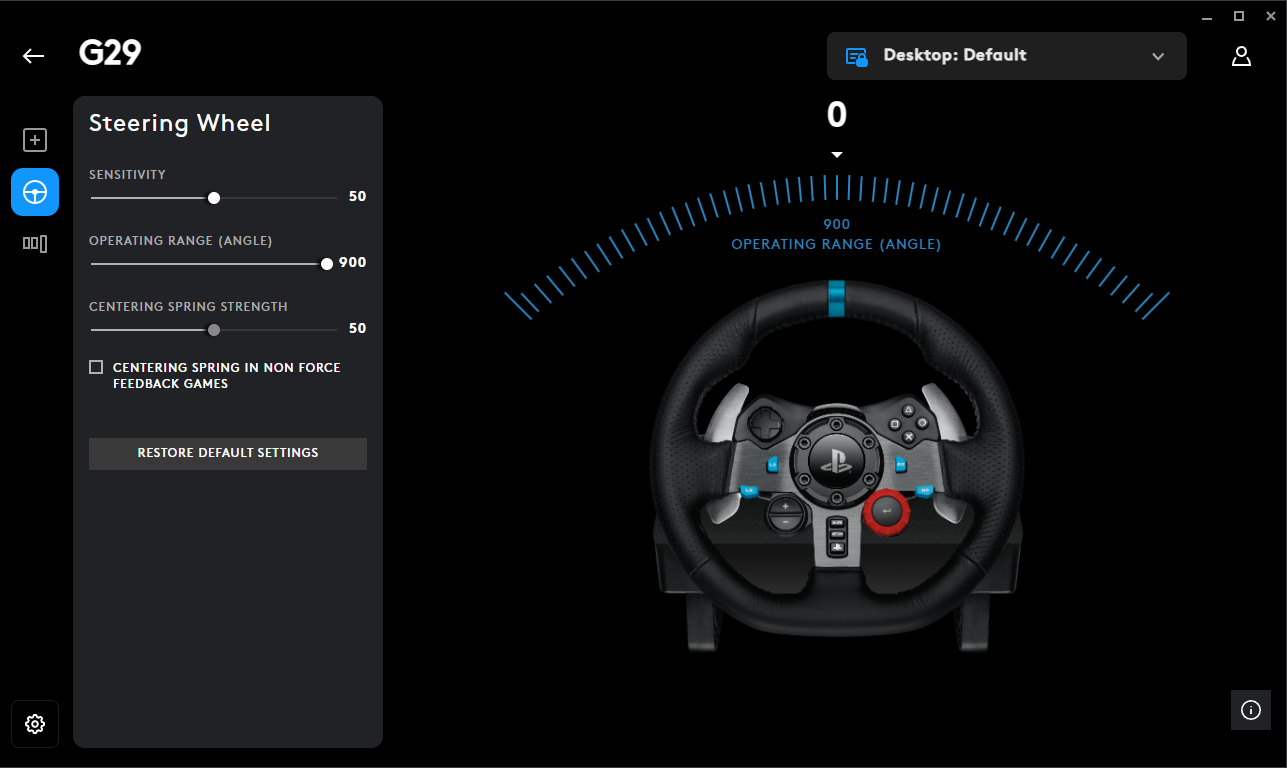
If you're running a Logitech wheel, set it up properly in G HUB first — otherwise ETS2 won’t give you proper force feedback. These are the settings I’ve tested and stuck with. It feels solid and responsive without being overly stiff or floaty.
- Sensitivity: 50 (neutral, keeps wheel response natural)
- Operating Range: 900° (this must match in-game — trucks turn wide)
- Centering Spring Strength: 50 (optional, adds a bit of return force)
- Centering Spring in Non-FFB Games: OFF (leave this unchecked)
900° is key, that’s the closest to how actual truck steering works. Your wheel should turn as much in-game as it does in real life.
Tip: If you want more resistance or “weight,” bump the spring strength to around 60. If you want looser, drop it to 40. I usually stick with 50 feels right for long drives. I personally dont use centering spring settings, i let the game handle it and turn it off in GHUB.
Also make sure there are no conflicting keybinds or pedal inputs in G HUB that override the game ETS2 handles everything better when it’s in full control.
If you're using Thrustmaster, Fanatec, or anything else, the idea stays the same: - Match 900° steering angle (or your wheel’s max)
- Turn off any extra auto-centering features (FFB handles that)
- Keep damping low heavy vehicle, but not unrealistic steering
Once you’ve dialed this in and It will match with the in-game Force Feedback setup, the steering starts to feel like it actually belongs to a 40-ton truck.
Advanced Realism Tweaks (braking, steering, deadzone, FFB)
If your truck feels way too twitchy, brakes grab too fast, or the wheel just doesn’t feel right this section is for you. The controls.sii file in ETS2 can be edited to make the game feel smoother and more realistic, especially if you use a wheel and pedals (but it helps for keyboards too). Here's what to tweak.
Fix the Brakes & Make Them Progressive
By default, braking is super sensitive. Even a small press on the pedal stops you like you hit a wall. That’s because the brake input is linear.
To make it feel more real like a real truck where you ease into braking you can add a curve. Open your controls.sii and find the line starting with mix abackward.
Replace it with this:
mix abackward pow(normalize(sel(c_jzbrake, sel(c_jibrake, -j_brake?0, j_brake?0), sel(c_jibrake, j_brake?1 * -0.5 + 0.5, j_brake?-1 * 0.5 + 0.5)), c_brake_dz), 2.5)
This line adds a curve to your brake pedal. That 2.5 at the end is the curve amount:
- 1.0 = No curve (default)
- 2.0 = Smooth start, firm stop
- 3.0 = More progressive
Tweak that number based on how it feels. I personally like 2.5–3.0.
Smoother Steering & Not So Twitchy
If your wheel feels way too sensitive, especially at highway speeds, try this. In the same controls.sii, find:
constant c_steer_func 0.000000
Change it to:
constant c_steer_func 3.000000
This adds a nice curve to your steering. Makes it gentle around the center and more responsive as you turn further. You can test with 2.0, 3.0, or even 4.0.
Clean Up the Deadzones
Sometimes your pedals or wheel feel "lazy" or unresponsive at the start, that's the deadzone. Drop it down so your inputs are snappy but not jittery.
Change these:
constant c_brake_dz 0.01
constant c_throt_dz 0.01
constant c_clutch_dz 0.01
constant c_steer_dz 0.00
Speed-Based Steering Sensitivity (Optional)
This one adjusts steering based on your speed. Less sensitive when you're driving fast, more responsive at low speeds, kind of like how real trucks behave.
constant c_rsteersens 0.3
constant c_asteersens 4.0
If your steering still feels too sharp at high speeds, this should help a lot.
Better Force Feedback (For Wheels)
If your force feedback feels numb or chaotic, use this setup. Works well for Logitech G29, Thrustmaster, and Fanatec wheels.
constant c_ff_gain 5.000000
constant c_ff_surface 0.200000
constant c_ff_bumps 0.800000
constant c_ff_engine 0.100000
constant c_ff_collis 0.720000
constant c_ff_gearbox 0.320000
You can tweak the gain up/down if your wheel feels too heavy or too light. I usually float between 4.5 to 5.5 depending on the truck.
How to Do All This
- Find your
controls.siifile in: Documents/Euro Truck Simulator 2/profiles/[[b]your_profile_id[/b]]/controls.sii - Make a backup of it before editing! (VERY IMPORTANT)
- Open it in Notepad or Notepad++ (i use my IDE VS code)
- Edit the values above
- Save and set the file to Read-Only if you don’t want the game to reset your changes
- Restart the game fully
Realistic Steering Setup (Force Feedback)
First off if you’re using a keyboard or gamepad, don’t overthink it. Just set your gearbox to Sequential, and make sure your Gameplay Settings match what’s listed in the realism section above. That’s more than enough. Keyboard doesn’t give you analog control, so fine-tuning physics won’t matter much.
Now, if you’re on a wheel — especially something like the Logitech G29, T300, or similar this section is for you. I use a G29 myself, and this setup is meant to feel grounded, like you’re actually driving a heavy vehicle. No overdone shaking or twitchy turning, just solid road feedback and weight.
Steering Configuration
- Steering Sensitivity: 0.50
- Steering Non-Linearity: 0.00
- Steering Animation Range: 900° (match this to your wheel’s rotation in Logitech G HUB or your wheel software)
This gives you a 1:1 feel when you turn your wheel, it matches in-game exactly. No twitchiness, no arcade-style flicks.
Force Feedback Setup
This is where the realism kicks in. These are the settings I run, tweak to your liking, but this gives you a heavy, real-world feel without overdoing it.
- Force Feedback: Enabled
- Overall Gain: 100% (sometimes I bump to 110 or 120 depending on mood or road type)
- Centering at High Speed: 100%
- Centering at Low Speed: 42%
- Internal Friction: 10%
- Engine Resonance: 20%
- Terrain Surface: 80%
- Bumps: 72%
- Collisions: 32%
- Gearbox Grind: 32%
- Understeer Slip: 32%
- Assisted Steering: 0%
- Terrain Surface Vibration: 100%
- Bumps Vibration: 100%
- Collisions Vibration: 100%
This config gives you the feeling of weight. You’ll feel the road surface change, dips, trailer resistance, and that subtle tug when turning too sharp with a loaded trailer. The engine rumble is there but not annoying. Gearbox grind makes you think twice before sloppy shifts, especially if you’re using an H-shifter like me.
This isn’t “cinematic” it’s meant to feel like a 40-ton machine fighting back a bit when you push it.
If you want to actually feel like you're trucking, not just playing a game, this is a solid base to start from. Wheel users - dial in these settings, take a heavy trailer, and go climb a mountain. You'll know why it matters.

Modern Truck Setup (2016+)
If you’re driving newer trucks in ETS2 (especially Volvo FH, Scania S/R NG, DAF XG+, MAN TGX Euro 6), their real-world counterparts are completely different from older models. These trucks come standard with auto transmissions, advanced safety systems, and stiffer physics. Here's how to adjust your game settings to reflect that.
Transmission Settings – Realistic for Modern Trucks
Volvo FH (I-Shift)
- Real-life: All automatic with I-Shift system
- Game: Use Adaptive Automatic or Sequential Override
- Best Setup in game (I.M.O): Transmission Type: Adaptive Auto, Smart Sequential: Enabled
Scania S / R NG (2016+) - Real-life: Opticruise automatic is standard; manual is rare
- Game: Use Auto or Sequential if paddles
- Tip: Use retarder manually for hills, as Scania does IRL
DAF XG / XF (2021+) - Real-life: TraXon automated only, no manual offered in EU
- Game: Use Adaptive Auto, map engine brake for realism
MAN TGX Euro 6 / New Gen - Real-life: TipMatic transmission, fully auto
- Game: Stick to full auto with manual override if preferred
Advanced Truck Tech – Simulate Modern Features
Modern trucks are packed with safety assists to abide the EU law. ETS2 doesn’t simulate all of them, but below i have table on how to approximate them, i am not completely sure on if this replicates it but if you have suggestions, i am always open for it (Please Comment):
(I didn't verify this with a real trucker who drives those trucks, but if you drive please let me know if i need to make changes or add anything)
FeatureReal TruckETS2 SettingMy Personal Recommendation ABSStandardAutoLeave Enabled Adaptive CruiseCommon (Volvo, MAN, DAF)Adaptive Cruise ControlEnable for realism Lane Keep AssistOptionalLane Assistant ModeDisable (in-game version is clunky, it kind of helps if you are eating or drinking something while driving but for long drives it becomes annoying) Rain Sensor / Auto LightsStandardEnable in gameplayOptional for immersion Smart Cruise HoldAvailable in many modelsSmart Cruise ControlEnable if using automatic
Physics Tweaks for New Trucks – Why They Feel Different
Modern European trucks are required by law to include advanced safety systems like Electronic Brake Systems (EBS), Electronic Stability Control (ESC), and improved cab suspension. This makes new trucks feel tighter, more stable, and more "assisted" compared to older models.
These laws started ramping up post-2012, and by 2016–2018, most new trucks were being delivered with:
- Advanced suspension geometry for cab comfort and reduced sway
- ABS and EBS as legal requirements
- Load-sensing brakes and electronic retarder integration
- Stronger cab mounts with reduced flex on rough terrain
To simulate this in ETS2, tweak your physics settings like this: - Cabin Suspension Stiffness: 30–35%
– Modern cabs are better damped and don’t bounce around like old rigs. - Truck Stability: 20–25%
– Reflects lower center of gravity and automatic stability control systems (ESC). - Trailer Stability: 0%
– Most modern trailers are designed to resist rollovers without needing fake stability assists. - Braking Intensity: 60–70%
– This simulates real-world EBS (electronic brake force distribution) which gives trucks better stopping pow