 Day One Fixes
SolvedFixUpdated
Dice Hoarder Bug Fixes: Black Screens, Softlocks, and Achievements
Short answer
Players facing black screen issues can press F11 to toggle fullscreen, roll a D20 in the desk tray for achievements, and use launch options or file verification for crashes.
Reloaded my save and now everything is dark
The problem
I jumped back in to my game and the room with the computer is pitch black and the shop itself seems darker as well. It seems like all the lights are off but theres no light switch any where. Not sure if it's a bug or not.
moondaisies, original post
What players suggest
Hit F11 to remove it from full screen and then hit it again and it fixes it.
L0g1cal
I'm new to the game, but am also having this problem. I've updated my graphics card, tried fullscrren, windowed, and borderless, switching between them, and nothing helps. Everything is just... black (save for a few things, like the windows).
agwitow
Hi! We are aware of this issue and we are actively looking into it. If you are playing in story mode, does going into the basement and exiting, fix this? Did you save and quit during evening or night time? When you load in, do the shop's window glow or are they dark? Does it give you the option to sleep? Any info on the above could help us track down what is causing this, thank you!
DieCorp Games
I’m also having the same problems. The windows and lights are glowing but the rest of the store is a black void with glowing dice
SaintVandar
hi my game just black screens and my ram gets absolutely eaten by this game until it crashes everything. i have some weird errors fromt his game about no memory left that i have never seen before
Max
also to add for me i beat the game and i tried to load into the save after beating the game and it just black screens
Max
I ran into this on a save load - the room with the computer and bed being nighttime dark, but the rest of the shop was light (or at least enough light was coming off the windows that it seemed light). I quit to the menu and re-loaded the game, and everything was fine on the re-load. I definitely had saved and quit during the daytime. Edit: Just restarted and got it again. My bed gave the option to sleep, but I could still pick up and place dice on shelves. And again, quitting to the menu and re-loading fixed it. I know that I saved during daytime. Screenshots of what I saw are here: https://steamcommunity.com/sharedfiles/filedetails/?id=3840006731 https://steamcommunity.com/sharedfiles/filedetails/?id=3840006822 https://steamcommunity.com/sharedfiles/filedetails/?id=3840006892
tripbillie
also to add for me i beat the game and i tried to load into the save after beating the game and it just black screens This has also just happened to me. Can’t close the game, not even via task manager
DezSosDinok
Got the dark lighting bug as well. The windows and some light sources were glowing. Turning off the Global Illumination for me fixes it, but the texture looks odd with the option turned off.
RocRabbit
I'm running into this same exact issue, but saving/reloading does not fix it. Dark office with sleep prompt in the bed, and lighting in the main area is day, but possibly seems darker than normal in some places (might just be my memory of prior day lighting is off). EDIT: No, this main room lighting definitely is darker than normal. EDIT 2: Finishing the day off and sleeping to the next day fixed it, but it came back the next time I started the game back up. This time however, another Save/Reload (without quitting to desktop) did fix it.
Stump Chunkman
I'm softlocked
The problem
Got to the first "Sleep or investigate" section. It asked to find a red floppy disc and when I went to upload it to the pc it disappeared. I saved and quit but when returning, I was stuck on the pc with the "sleep of investigate" window on the screen. The only way to click a button is to hit escape and click either sleep or investigate. Once i click investigate, I cant move the character and can only zoom in with right click and crouch. Closing the game, saving and quitting all dont work so I think I managed to softlock myself edit: I'm also unable to move if I select the "Sleep" option.
Mifjori, original post
What players suggest
theres a new EXE on the PC its a Audio thing its not a skill
ElysiumNight
Ahh I see! Unfortunately the character is still stuck and I'm unable to move :(
Mifjori
Hi! We are looking into it right now and hopefully we will be able to add a fix to our next patch to free you! We are sorry you got this bug and thank you for reporting it!
DieCorp Games
I appreciate yall! Thank you so much!
Mifjori
I just hit this same bug myself, friend. I saved and quit after getting that email but before going back to bed or doing "anything else", and when I boot the game back up it tries to run both parts of the scene at the same time, putting me at the computer screen but also asking if I want to investigate the noise, and I can't get out of that screen after that.
Veggieleezy
Hi! We just pushed a small patch containing a fix for this. Hopefully you are now free! Please let us know if everything is okay. Thank you!
DieCorp Games
I'll let y'all know as soon as I can boot back in! Thank you!
Veggieleezy
IM FREEE! THANK YOU SO MUCH!
Mifjori
As am I!
Veggieleezy
Nat20 success
The problem
I got the nat20 multiple times on that rolling dice spell, but never got the achievement. Any info about this ?
Jenjira, original post
What players suggest
On the desk where you can put the boxes there's a dice tray. You have to roll a D20 in there and get it and the achievement will pop
Puppy™
Ohhhh thanks a lot !
Jenjira
I did this during play for sure, never popped/ Just checked, went and did it again, still no achieve. But when I looked at my post-game achievement round up, it showed I unlocked, but also showed as a locked achievement too? Anyone else have this?
Froggo
I did roll a 20 in the dice tray too and nothing happened
mrsfrappucchino
Checking now, it seems it has unlocked, must've been a steam bug/delay?
Froggo
Checking now, it seems it has unlocked, must've been a steam bug/delay? I still don't have it 🥲 maybe I need to roll more lolol
mrsfrappucchino
omg I thought the achievement meant a nat20 with the skill that let's you put a whole dice set away if you roll well. I've gotten two nat20s and came to find out why I still don't have the achievement... It was killing me bc I don't like using skills in organizing games and every time I got a high roll that wasn't a 20 I died watching the dice sort themselves ;-; Just rolled in the tray and got the achievement.
Kiberz
Graphics really low despite ultra settings
The problem
Is anyone else having really blurry graphics, as if everything is set to low when the settings are marked as high/ultra? I've tried reinstalling the game, I've checked my graphics drivers etc but I can't find a fix. It was running fine just a couple of hours ago.
Retro Bagel, original post
What players suggest
Same problem. The textures looked fine yesterday when I was playing but today its just all blurry. I tried messing with the settings again and restarting my computer but no luck. I definitely don't have an optimized computer for this game but I was at least able to get it to run fairly well where I could actually see how the dice looked so this is annoying
jonathanmycroft
Try turning dither effect off in settings, worked for me.
BladezzGH
Try turning dither effect off in settings, worked for me. I tried that but it didn't seem to go away. The dark areas look weird and spotty (literally), as does the floor if I'm looking down while standing up.
Jinx
Try turning dither effect off in settings, worked for me. Its already off for me :( I tried turning it on and off again but it didn't make any difference. I've submitted it as a bug report so hopefully they can fix it sometime :)
Retro Bagel
Try turning dither effect off in settings, worked for me. Did try this, graphics didn't improve unfortunately
jonathanmycroft
How To Fix Dice Hoarder Crashing On Steam
Adjust Launch Options and Verify Files
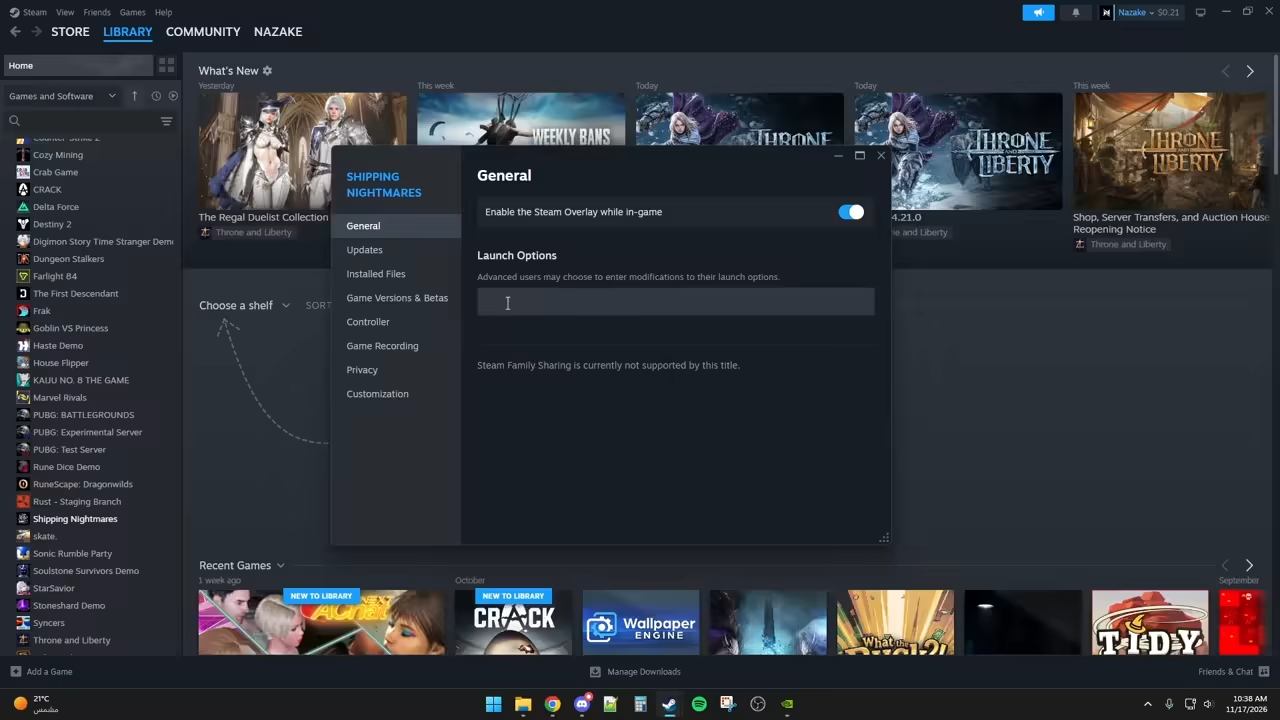
First, you want to go back to your library, and then you will need to right click on the game in your library and go to the general tab. In the launch options, you can add -dx11. And if this still doesn't launch the game properly, you can try 12.
Now you can go to installed files section and click on verify the integrity of game files. And once this is completed, you can close Steam.
Install Redistributables and Restart
Next, you will need to open up your browser and navigate to this link, which you can find below in the video description. From here, you will need to get the redistributables. So you will need to download and install the 86 and the 64, both of them.
And once you finish this installation, it will require a computer restart, so make sure to do that.
Update GPU Drivers and Run as Admin
And the next thing you'll need to do is update your GPU driver. So if you're running an Nvidia GPU, you will need the Nvidia app installed, otherwise you will need the AMD software if you're running AMD. And then go to drivers, check for updates, and make sure to download and install the latest available update.
And now all you need to do is launch Steam as admin by right clicking on Steam and run as admin. And then try to launch the game from your library, and this should solve the crash problem.
Perform a Clean Startup Configuration
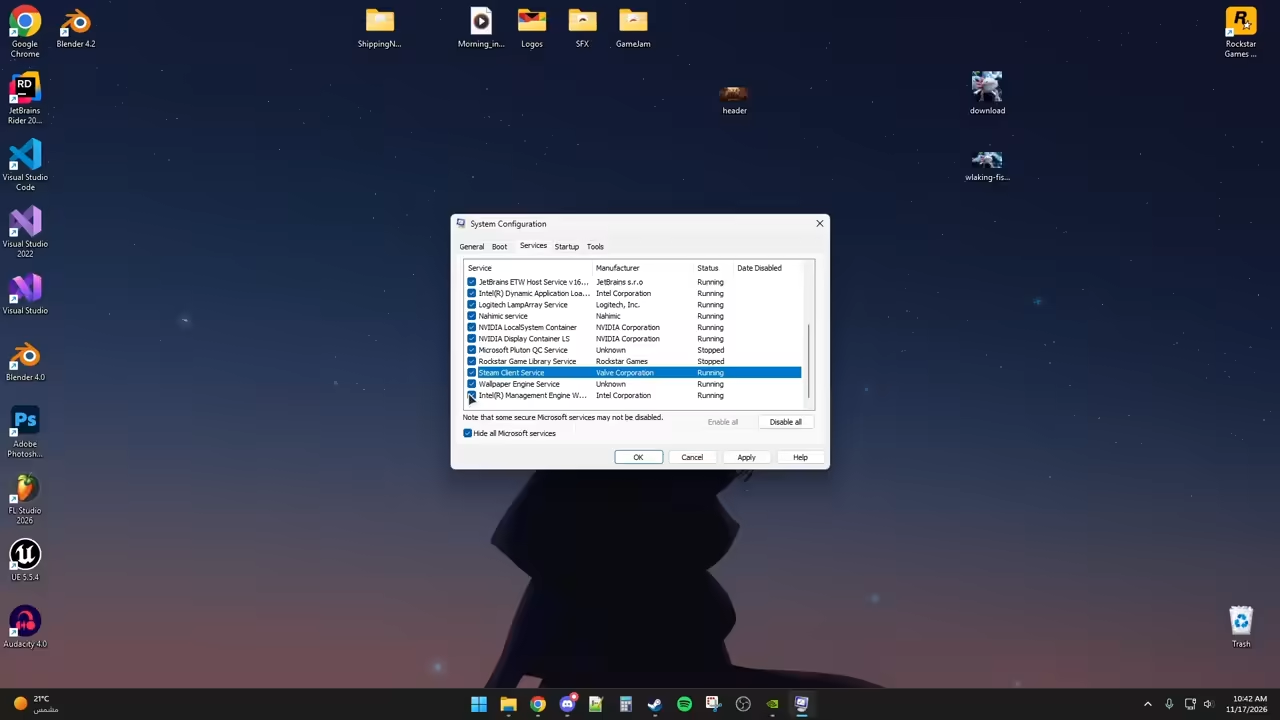
Now, if you do still have crashes as soon as you launch the game, another way to solve that is to right click on the start button, go to run, and then type msconfig and press okay. And in this window, go to services, click on hide all Microsoft services, and then you can try to go through this list disabling anything that is not directly related to your GPU driver or GPU and audio.
And you can also leave the Steam client and uncheck everything else that is basically not required to load at the startup of your system. Or you can try to disable all and then click on apply and this will basically restart your computer to apply these changes.
Then you can try to launch the game again and this should usually solve the problem. And if you want to restore it back, you can come back here, hide all Microsoft services and enable all again, click on apply and restart and it will go back to the default settings.
Did this work for you?
Related topics: crash fixes, black screen fixes, save fixes, achievement fixes