 Day One Fixes
SolvedHow-toUpdated
Useful Deadlock Commands
Short answer
Useful console commands in deadlock for practice and having fun with friends etc.
Steam Community guide by LiL Iroh 女.
Basic information
How to open console
You can open the console by using F7 by default
How to set up a config file for commands on startup
You can also set up a config file if you have any commands you would like to run automatically on startup, Eg. putting “citadel_unit_status_use_new true” in your config file (without the " ") will make sure you always have the new health bars enabled.
- In Steam, right click Deadlock and choose properties. In General > Launch Options, add -exec autoexec
- In Steam, right click Deadlock and choose Manage > Browse Local Files. Navigate to game > citadel > cfg. Create a new file called autoexec.cfg.
- Copy paste the commands you wish to run at startup into that config file.
Bonus
Link to a list of all deadlock commands [deadlock.wiki] very usefull for finding commands you can't find online, Tip use Ctrl+F and type in a keyword of what you want the command to do.
The Old Gods, New Blood update (Give Legendary items and more)
Give legendary items command
Display name Command Runed Gauntlets giveitem upgrade_runed_gauntlets Apex Combat NOT IN GAME Infinite Rounds giveitem upgrade_infinite_rounds Eldritch Shot / Haunting Shot giveitem upgrade_eldritch_shot Ancient Shielding NOT IN GAME Shadow Step NOT IN GAME Timeless Emblem NOT IN GAME Haunting Scream NOT IN GAME Shadow Strike giveitem upgrade_shadow_strike Unstable Concoction giveitem upgrade_unstable_concoction Eternal Gift giveitem upgrade_eternal_gift Shrink Ray giveitem upgrade_shrink_ray Mystical Piano giveitem upgrade_mystical_piano Omnicharge Pendant giveitem upgrade_omnicharge_pendant <0-3> (ignore the < >) Prism Blast giveitem upgrade_prism_blast Nullification Aura giveitem upgrade_nullification_aura Cloak of Opportunity giveitem upgrade_cloak_of_opportunity Eletric Slippers giveitem upgrade_electric_slippers Celestial Guidance / Celestial Blessing giveitem upgrade_celestial_guidance Aerial Mastery NOT IN GAME Icarus Wings giveitem upgrade_icarus_wings Patrons Blessing / Mystic Conduit giveitem upgrade_patrons_blessing Frostbite / Frostbite Charm giveitem upgrade_shivas_bracelet <0-3>
Roulette wheel
You can force the roulette from street brawl via this command:
citadel_loot_table_test_street_brawl_draft_round
Testing out enhanced items
This makes all items in the shop enhanced
citadel_item_purchases_force_enhanced true
Big thanks to this reddit post and everyone commenting for helping me with finding these commands:
https://www.reddit.com/r/DeadlockTheGame/comments/1qkf3nb/all_legendary_items_and_how_to_get_them/
Practice Commands
Empty map with useful cheats enabled:
"map dl_streets"
Once you're in the map
"citadel_crate_respawn_interval 0; sv_cheats 1; sv_allchat 1; sv_alltalk 1; citadel_allow_duplicate_heroes 1; host_timescale 1; citadel_coop_sandbox 1; citadel_hero_testing_enabled 1; sv_cheats 1; citadel_hero_testing_infinite_money true; citadel_allow_purchasing_anywhere true; ai_step; kingme; toggle hud_damagemeter 1"
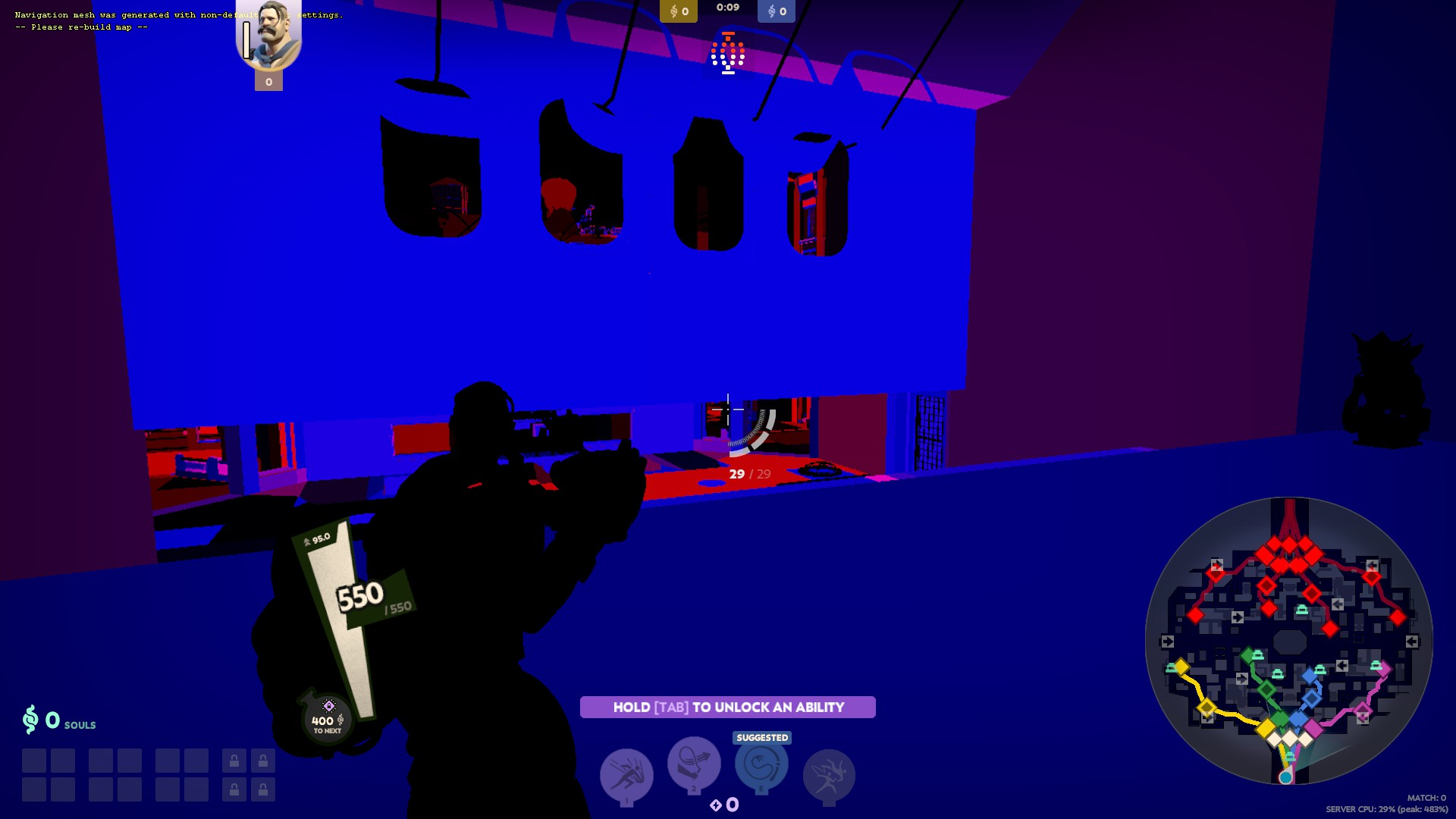
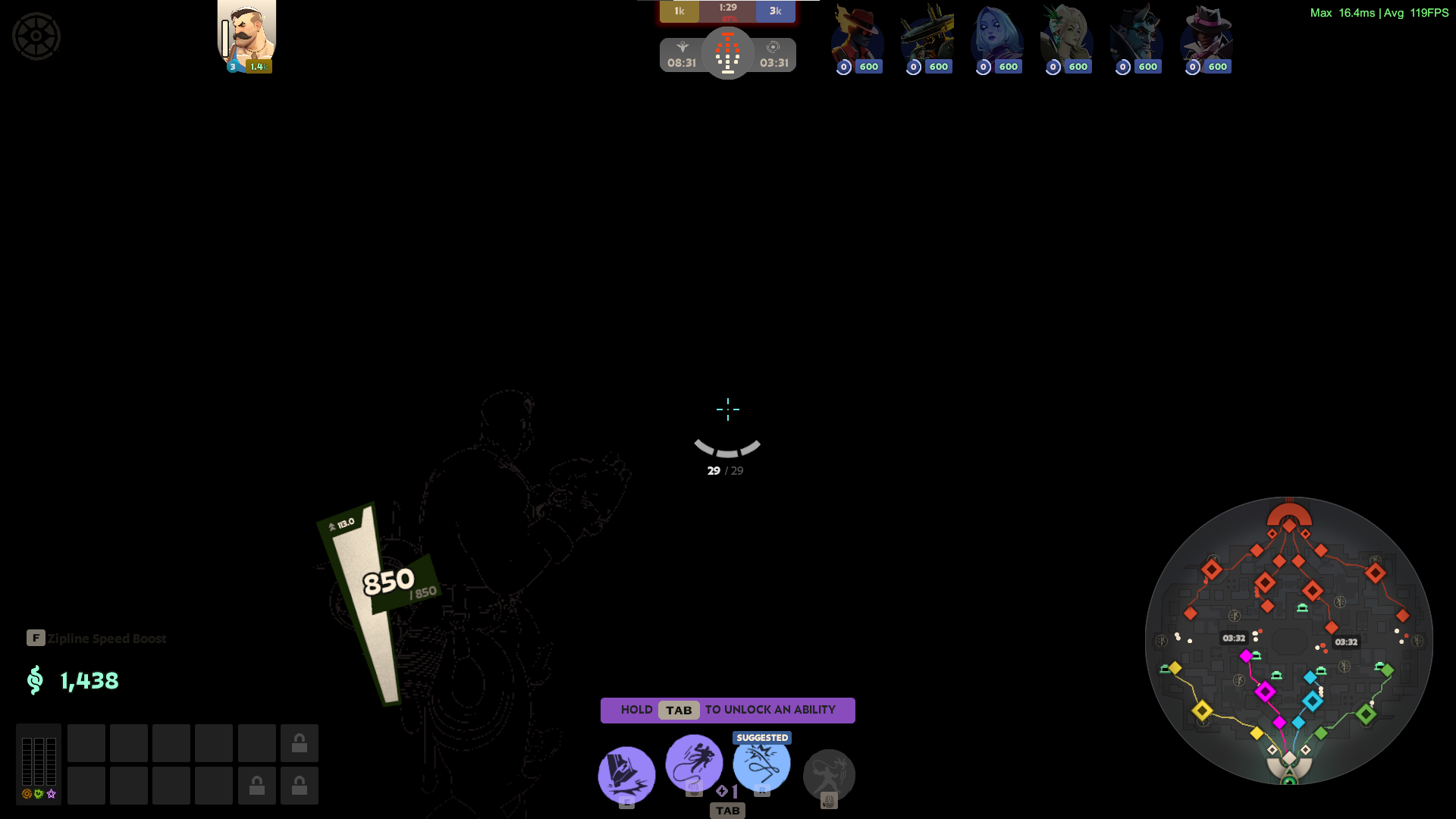
If your map ever looks like one of these 2 instances:
try mat_fullbright 0 to fix it
Orb Spawner:
"ent_create citadel_herotest_orbspawner"
possible bind
"bind 10 ent_create citadel_herotest_orbspawner"
Pause and Unpause Troopers:
"ai_step" & "ai_resume"
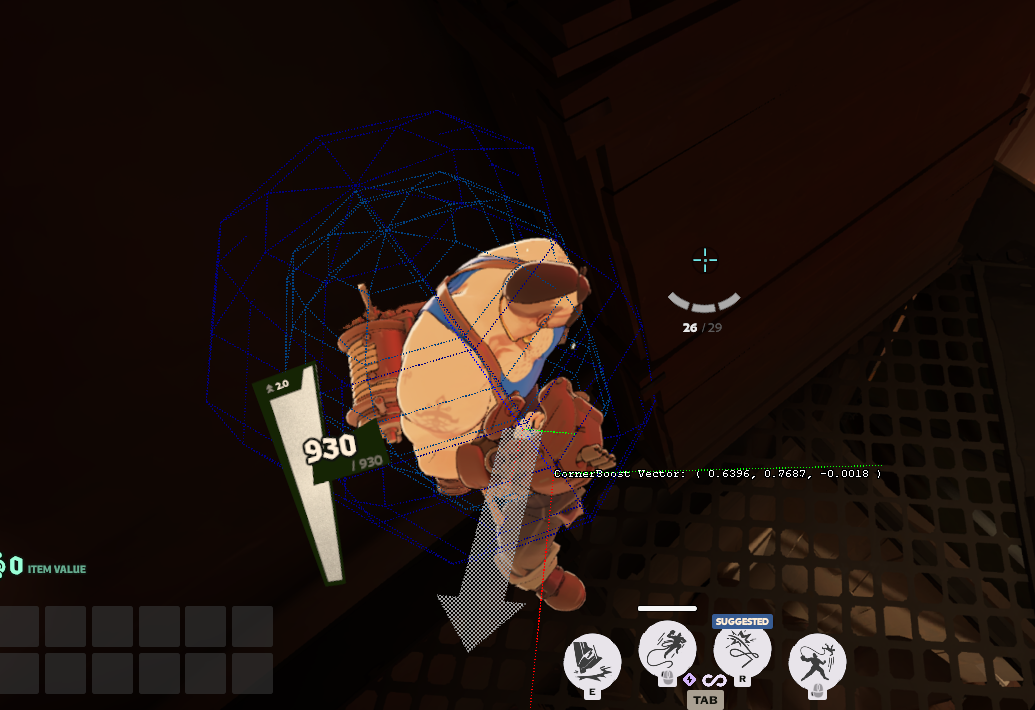
Cornerboost/walljump debug
"citadel_wall_detection_debug 1"
Keybinds in deadlock
(Note: +jump does not work in deadlock you should use +in_mantle (bonus: +in_innate1 for dash/roll))
- Melee: — "+in_weapon1"
- Ability1: — "+in_ability1"
- Ability2: — "+in_ability2"
- Ability3: — "+in_ability3"
- Ability4: — "+in_ability4"
- AltCast: — "+in_alt_cast_modifier"
- CancelAbility: — "+in_cancel_ability"
- Item1: — "+in_item1"
... same for 2,3,4 (of course replacing the 1) - Jump/Mantle: — "+in_mantle"
- Roll/Dash: — "+in_innate1"
- Crouch: — "+duck"
- CrouchToggle: — "+in_duck_toggle"
- Zipline: — "+in_zipline"
- MoveForward: — "+forward"
- MoveBackwards: — "+back"
- MoveLeft: — "+left"
- MoveRight: — "+right"
- MoveUp: — "+in_move_up"
- MoveDown: — "+in_move_down"
- Attack: — "+attack"
- Aim/ADS/AltFire: — "+attack2"
- PurchaseQuickbuy: — "citadel_purchase_quickbuy" (Note: no + here)
- Reload: — "+reload"
- ResetCamera: — "reset_camera"
- Text Chat: — "say_chat message" (replace message with your message)
- ToggleMute: — "citadel_toggle_mute"
My favorite binds: - Instant Air Dash bind (IAD bind): — bind mwheeldown "+in_innate1; +in_mantle; -in_innate1; -in_mantle"
(NOTE: the --in_innate1; -in_mantle is very important if you do not add that part the game will think your space key/jump button is being help down and you will not be able to jump; if this happend do "restart" in console and update to the correct bind - in that order!)If you have the source modding SDk installed you can find a list of all bindable keys in SourceModding\Reduced_CSDK_12\game\citadel\cfg\citadel_keys.lst
Or here's a online pastebin (digital copy) (I do not own this one):
https://pastebin.com/QfNUT9S8
Generally useful commands - No sv_cheats enabled
The following commands do not require you to enable cheats and can thus be used in public games and ranked.
- mm_prefer_solo_only — If you prefer playing with other solo queue players
- citadel_unit_status_use_new true — new health bar
- deadlock_post_match_survey_disabled true — Disables the post-match survey. This gets set to true if you submit or skip a survey after checking “Don’t show this again”.
- bind key command — to attach a command or input value to a key (replace key and command)
- unbind key — to unbind the action from a key (replace key)
- citadel_hud_visible — to show or hide the HUD
Generally Useful Commands - sv_cheats true
All of these require entering sv_cheats true first
- citadel_hero_testing_enabled true — Enables the “Testing Tools” menu from the Hero Sandbox. Enabling the menu does not require cheats, but using any of this menu’s functionality will.
- noclip — allows you to fly around the map and trough walls
- citadel_allow_purchasing_anywhere — allows the purchase of items anywhere on the map
- toggle hud_damagemeter 1 — show damage per second
- cl_showpos 1 — Shows hero position and velocity
- kill — die immediately
- trooper_kill_all — kill all troopers
- kingme — Gives you 1.2 million souls and levels up all your abilities.
- citadel_hero_testing_infinite_money true — Gives players infinite souls and ability points.
- trooper_kill_all — Kills all non-neutral creeps and guardians that aren’t shielded.
- dump_hero_names — shows a list of all the Heroes in the game including unreleased heroes
- selecthero hero_name — change hero to whatever hero name you write down, can be used to play unreleased hero's
- getpos — get your current coordinates (Useful for taking screenshots in the same exact position for comparisons combined with setpos and citadel_hud_visible false/true)
- setpos — move to the mentioned coordinates
- explode — die immediately
- hurtme — deal 10 damage to self
- **ent_create citadel_item_pickup ** — spawn soul urn.
- ent_create citadel_item_pickup_rejuv — spawn rejuv
- npc_create neutral_trooper_weak — Jungle Camp T1
- npc_create neutral_trooper_strong — Jungle Camp T2
- npc_create neutral_trooper_normal — Jungle Camp T3
Playing unreleased hero's
- dump_hero_names — shows a list of all the Heroes in the game including unreleased heroes
- selecthero hero_name — change hero to whatever hero name you write down, can be used to play unreleased hero's
Debug Commands
This section contains various usefull debug commands that might help you to test things or understand the game better.
Debugging collisions:
citadel_show_bullet_lag_compensation [NUMBER]: This shows the actual hitbox used for bullets, this will toggle it on any entity you shoot for the time you have put in the [number] section
example: citadel_show_bullet_lag_compensation 1
Using the command ent_vcollide_wireframe you can view the wireframe of anything you're looking at at the time of entering the command. Note this is not used for bullet collision as far as I'm aware.


Debugging Line Of Sight
citadel_debug_ent_los true This can be usefull to better undestand abilities that work using line of sight such as billies ult. (Red means line of sight (LOS) is broke green means something is within line of sight)
Misc
citadel_wall_detection_debug 1 Cornerboost/walljump debug
r_showdebugoverlays true This one is interesting but its messy. This can help visualize various things, its quite usefull for general debugging allthough most of it you wont need such as textures, buffers, items file names, particle bounding boxes etc.

- citadel_ability_debug true : this allows you to debug abilities so that there's absolutly no cooldown, unlike citadel_enable_fast_cooldowns (the command used in the debug window) this has a actual cooldown of 0 rather then 1 second
- citadel_spawn_all_heroes_in_a_line: This will spawn all heroes in a line this can be usefull for testing piercing damage or to just quickly spawn in multiple heroes.
- citadel_spawn_urn: Spawns urn
- differences: Allows you too see what commands have been changed on a server or locally
change server / matchmaking region
Command Regon citadel_region_override -1 Auto citadel_region_override 0 North America citadel_region_override 1 Europe citadel_region_override 2 Asia citadel_region_override 3 South America citadel_region_override 4 Oceania
Spawn Entities and NPC's
Entities
Random funny items?
ent_create entity_name citadel_breakable_prop_car - Cyber car
ent_create entity_name vehicle_car_05 - Cyber car
ent_create entity_name citadel_shield - Shield
ent_create entity_name citadel_payload - Nuke
ent_create entity_name citadel_cat_animating - Calico cat
ent_create entity_name citadel_hideout_clock - Clock
ent_create entity_name citadel_bounce_pad - Bugged Holiday jump pad
ent_create entity_name citadel_energy_tower - What even is this
ent_create entity_name item_crate - Error dummy (falls funny)
ent_create entity_name citadel_base_glass_horiz_01 - Glass
ent_create entity_name citadel_base_glass_vert_01 - Glass
ent_create entity_name citadel_breakable_prop_box_multi - Placeholder
ent_create entity_name citadel_item_punchable_gold - Huh
ent_create entity_name citadel_breakable_lion_statue - Lion statue
ent_create entity_name citadel_breakable_prop_vase - Vase
ent_create entity_name citadel_breakable_jar_01 - Pot
ent_create entity_name citadel_restorative_goo_cube - Small Viscous cube (error)
ent_create entity_name citadel_refresh_spawner - Strange rune
ent_create entity_name ent_create npc_necro_skele - Graves zombie
ent_create entity_name citadel_hideout_ball - Ball
BONUS:
citadel_hideout_ball_show_juggle_count 1 // Shows a fun juggle count minigame for hideout ball.
citadel_hideout_ball_show_juggle_fx 1 // Shows juggle visual FX for hideout ball minigame.
Box
ent_create entity_name citadel_breakable_prop_wooden_crate - Default
ent_create entity_name citadel_breakable_wooden_crate_02 - Old
ent_create entity_name citadel_breakable_wooden_crate_03 - Old
ent_create entity_name citadel_breakable_item_container - Golden statue
Christmas box
ent_create entity_name citadel_breakable_prop_xmaspresent01
ent_create entity_name citadel_breakable_prop_xmaspresent02
ent_create entity_name citadel_breakable_prop_xmaspresent03
Halloween box
ent_create entity_name citadel_breakable_prop_pumpkin01
ent_create entity_name citadel_breakable_prop_pumpkin02
ent_create entity_name citadel_breakable_prop_pumpkin03
ent_create entity_name citadel_breakable_prop_pumpkin04
Miscellaneous
ent_create entity_name citadel_item_pickup_idol - Urn (0 souls) (citadel_spawn_urn - Urn (1000 souls))
ent_create entity_name citadel_item_pickup_rejuv - Rejuv
ent_create entity_name citadel_item_pickup_rejuv_herotest - Rejuv
ent_create entity_name citadel_item_pickup_rejuv_herotest_infospawn - Rejuv
ent_create entity_name citadel_herotest_orbspawner - Soul spawner
ent_create entity_name citadel_item_powerup_spawner - Rune spawner
Summon NPC
Drones
npc_create heavy_drone_rocket
npc_create mirage_beetle_drone
npc_create Rocket trooper
npc_create trooper_siege
Lane troopers
npc_create trooper_normal
npc_create trooper_melee
npc_create trooper_medic
Forest troopers
npc_create neutral_trooper_weak
npc_create neutral_trooper_normal
npc_create neutral_trooper_strong
Large
npc_create npc_boss_tier3 (throne)
npc_create alt_npc_boss_tier3 (throne)
npc_create npc_super_neutral (mid-boss)
Walkers
npc_create npc_boss_tier2
npc_create npc_boss_tier2_weak
npc_create alt_npc_boss_tier2
npc_create alt_npc_boss_tier2_weak
Guardians
npc_create npc_boss_tier1
npc_create alt_npc_boss_tier1
npc_create npc_barrack_boss
npc_create shield_escort (fell lol)
Particles
npc_create trooper_zipline_container
npc_create npc_hero_clone_trooper
Dummy
npc_create npc_yakuza_gangster
npc_create npc_yakuza_kobun_summon
npc_create tier2_bull (error dummy)
Casino
npc_create neutral_sinners_sacrifice
Credits to: https://steamcommunity.com/sharedfiles/filedetails/?id=3654441640
My personal favourite commands
These commands don't really fit in any section but are still incredibly fun.
citadel_one_on_one_match true - When using this in the hideout this will make the bot's have a one on one fight, so Abrams will fight Infernus. This can also be used to test a build you have as the bot's can also fight you.
(citadel_solo_bot_match true this seems to do the same thing.)
You can also use notarget to make sure the bots don't target you if you just want to watch them fight.
citadel_hideout_ball_show_juggle_count 1 // Shows a fun juggle count minigame for hideout ball.
citadel_hideout_ball_show_juggle_fx 1 // Shows juggle visual FX for hideout ball minigame.
citadel_ability_debug true - this allows you to debug abilities so that there's absolutly no cooldown, unlike citadel_enable_fast_cooldowns (the command used in the debug window) this has a actual cooldown of 0 rather then 1 second
Hosting Custom Games
[OUTDATED] but you might still get something out of it / figure our how to get it to work, I'm currently quite busy :(
[DISCLAMER] This section has been shamelessly stolen from https://deadlock.wiki/Console_commands
- The host starts a custom game by loading into the map with map street_test
- You may want to pause the game immediately after joining by pressing P to give other players time to join the match.
- The host finds their ID by running status
- Find a green line in the console that looks like this: [Client] steamid : [A:1:XXXXXXXXXX:XXXXX] (XXXXXXXXXXXXXXXXX) (the Xs will be replace with numbers)
- Select the part after steamid that looks like this, including the square brackets: [A:1:XXXXXXXXXX:XXXXX]
- Right click and choose "Copy Selected Text"
- The host sends players the ID they just copied. Players can now connect to the game by opening their console and running connect [A:1:XXXXXXXXXX:XXXXX] (replace the part after connect with the ID they got from the host).
- Upon joining, players will be able to select their team and hero. To bring up this menu again, players can run changeteam 0.
- If you ever want to restart the game, the host can run changelevel street_test.
Adding Bots
- On the main menu, before you start the game, run exec citadel_botmatch_practice_6v6.cfg to load the bot config.
(used to be called exec citadel_botmatch_practice_6v6_hard) - You can replace hard with easy or medium to choose the bot difficulty.
- If you're already in a game, you can perform these steps then run changelevel street_test to restart the game instead of starting a new one.
- Run citadel_spawn_practice_bots false so that bots won't spawn immediately when the game starts.
- Run citadel_spawn_practice_bots_count 12 to ensure that bots fill all remaining slots (they'll be added until both teams have 6 players).
- Start the game (i.e. map street_test) and press P to pause the game during the pregame (as soon as you load in).
- You can use citadel_pregame_duration before starting the game to increase the duration of the pregame if you want.
- Allow all other human players to connect and select their team and hero.
- The team/hero menu can be a bit glitchy. Players can use the changeteam command instead (see table above for command description).
- Remember to choose your (the host's) own team and hero as well. This may automatically unpause the game - press P after selecting a team to pause again.
- After all human players have joined teams and selected heroes, the host runs citadel_spawn_practice_bots true, then presses P again to unpause the game. Bots should fill the remaining slots on each team.