 Day One Fixes
SolvedHow-toUpdated
Bodycam: Old Issues and Errors with the Game
Short answer
KEEP IN MIND THEY FIXED 90 IF NOT 100% OF THESE ISSUES, THE GAME IS NOW PERFECTLY PLAYABLE Probably Best Steam Guide So Far i like the game and it's concept, but i want to actually be able to play the game, and i truly hope that the devs will get over this issue and will solve it. (Remember the…
Steam Community guide by 𝕯𝖔𝖏𝖔𝖏𝖎.
The main issue....
Honestly i'm quite conflicted, I KNOW THAT THIS IS A EARLY ACCESS
BUT, the game's actually pretty fun and pretty cool looking, it can be disorienting at times but generally speaking, it's a pretty cool concept and fun game.
Now let's talk about what's not so good....
The optimization for this same is complete garbanzo it needs to be fixed asap because it makes the game almost unplayable...
Recap for those who dare to complain =
(if you have a God-like N.A.S.A computer you can obiously power trough this game bad optimization and still be comfortable around 100+ fps in-game, and 150/200+ main menu, and you'll probably feel like this game has no issues)
Now, from any other "normal" or "high-end" pc users that actually has the required specs to run this game but don't have a 4k or above pc =
(the game runs pretty good with fs3 enabled on balanced and fs3 generation on performance, ofc if you use nvidia it will have a lil bit less fps than radeon, anyway you'll be able to play most maps at 70 to 90+ fps, main menu 100/150+ fps)
Now you are probably asking yourself, "Then what is the issue? why are you saying that this game is not optimized and needs fixes?"
Well the issue here is that this game have super inconsistent fps, the fps drops are insane while playing maps, most of the times you go from 90+ fps while playing to 25/30 instantly after.
Most of the times the fps will lock to 25/40 too, and here's the thing...... This is an issue that MOST players are having
(obv N.A.S.A Pcs still have this issue too, but most of the time they power trough this issue)
Btw i did actually discuss this topic with a TON o people on the official game's discord server, and i can easely tell that a lot of people is having this issue right now.
If you bought this game, wait patiently for a fix or an update, if you want to buy it wait for a fix on an update.
(mind that this issue came into light after the 2 updates that the devs did after the game released....)
MIND THAT WE ARE TALKING ABOUT ANY COMPUTER THAT CAN EASELY RUN THIS GAME
(2k Pcs or even 1k or 1.5k Pcs can run this game SO please stop saying "you need to upgrade your components" or " you're pc is the issue" because in most cases it is NOT. If you do not know what you are talking about, don't talk about it, THANKS)
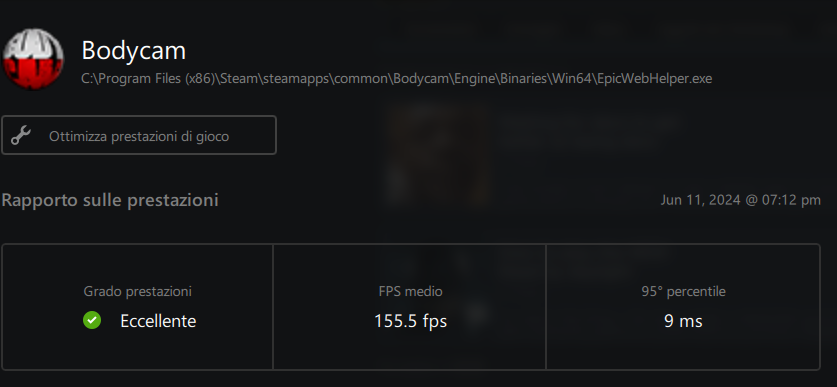
Graphics and solutions
PLEASE ACTIVATE STEAM FPS IN-GAME COUNTER OVERLAY
Steam/Settings/In game/FPS counter in game
I can obv say little to nothing but i want to help as much as possible with this topic too...
1- No you can't completely get rid of the grain filter as long as you use fs3 (you can try to minimize it as much as possible tho)
2- The most important settings as of now are fs3 and fs3 frame generation (as of now)
3- The graphic settings outside of fs3 change little to nothing in term of FPS gain or loss (epic quality is a lil bit more heavy tho)
-----------------------------------------------------------------------------------------------------
In term of actual Graphics settings with fs3 there's little to do about it...
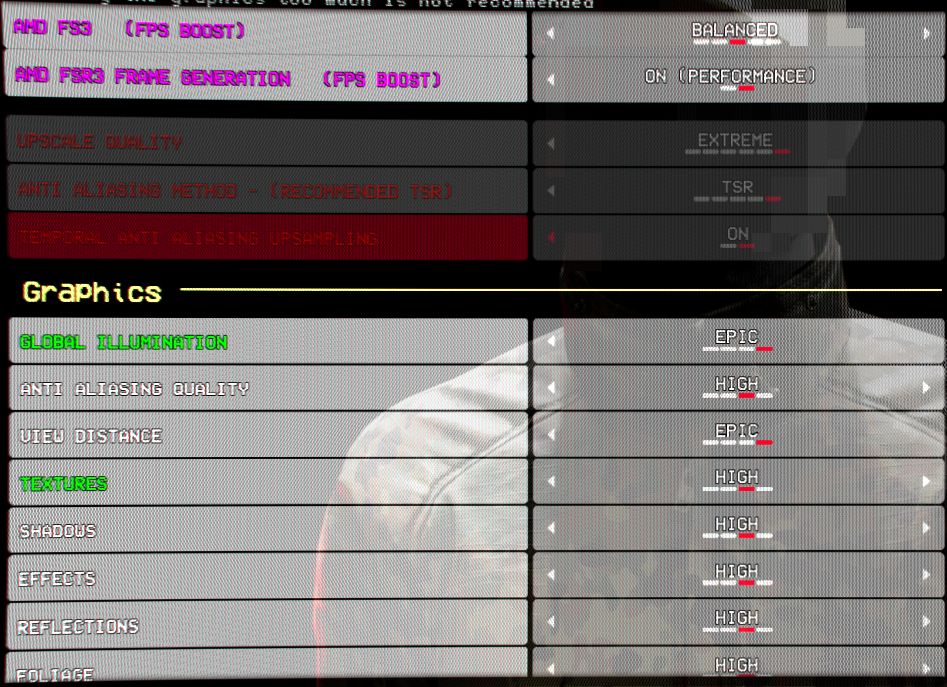
You pretty much have to work with fs3 frame generation on (performance)
you can choose amd fs3 on either (quality) - (balanced) - (performance) depending on your FPS gain
(keep in mind... amd fs3 (performance) gives you super grainy visuals)
Usually the rest of the graphic settings stay on HIGH or EPIC (exept for motion blur, keep it off)
use SHARPNESS only if you see grainy details, but don't over-compensate because it'll make it worse, usually keep it OFF or LOW.
Set GRAIN to off, if you want the game to be a lil bit more clear to the eye.
-Like this-
Now, going to the display it really depend and it's a personal choice,
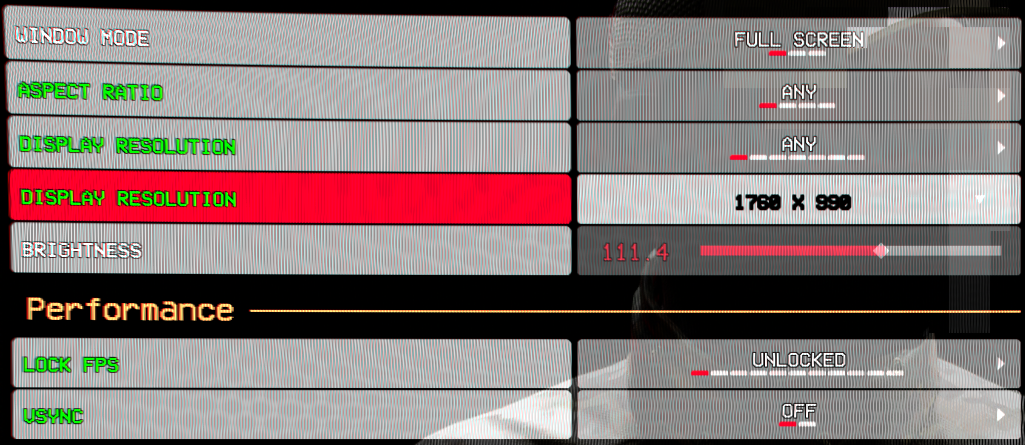
but ONLY if you have a Radeon GPU you can put the game on full screen lower the game display ratio and reder it as your main resolution,
that way you can gain more FPS and make the game a lil bit more stable.
Obv do not lock FPS and do not put VSYNC on (that would not help at all, in fact is quite the opposite)
-Like this-
(in this case i use 1760 x 990 because my monitor native resolution is 1920 x 1080)
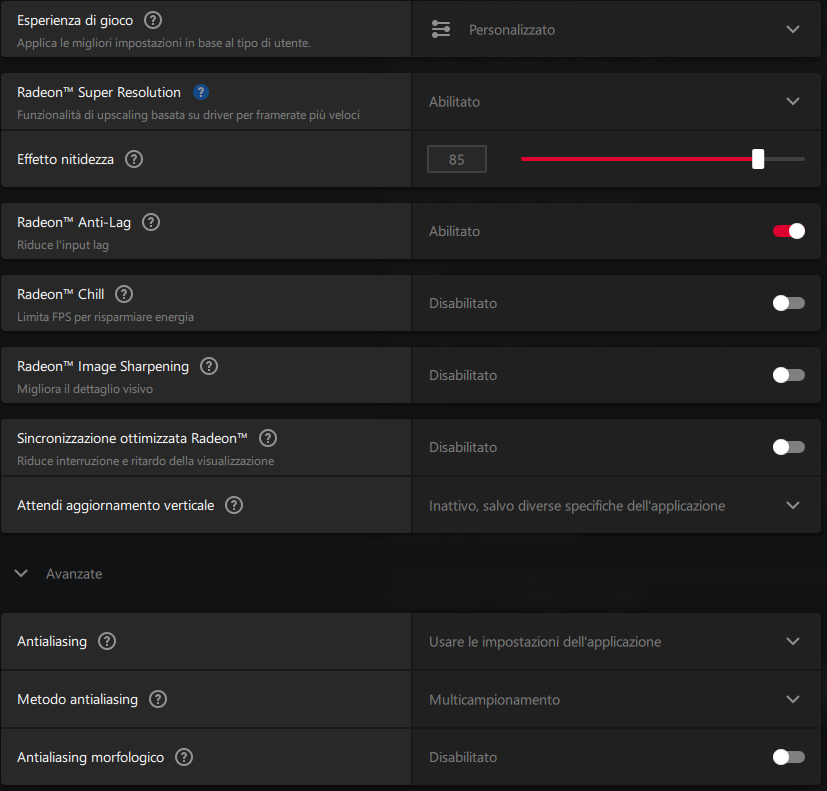
Again this is only for Radeon graphic cards, but you can pretty much customize trough AMD Software Adrenaline your Graphics optimizations before or while having the game open
(with alt-z as a default keybind)
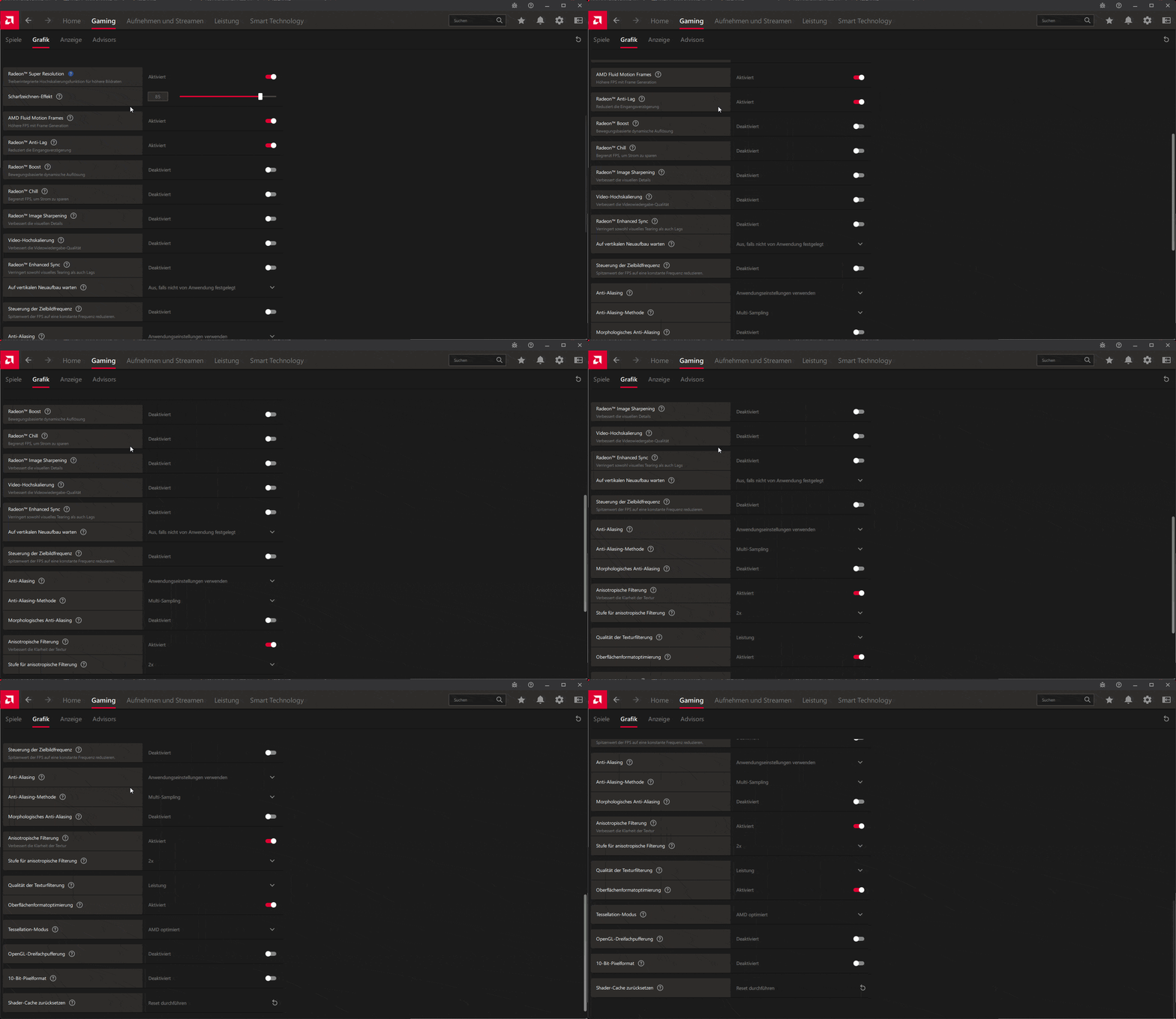
You can pretty much play around with different options and see what fits you better, but for referance here's my settings for the game.
Now keep in mind that my graphic card is not new, it's a 6 y/o Radeon Graphic card and for that reason there are less option on the Adrenaline Softare for me.
These are the full settings for BODYCAM (it's in German, ik but i couldn't find any other one)
-Like this-
(i know i still have to add the Nvidia Graphic card settings)
FOR THOSE WITH OTHER TYPE OF ISSUES
If you have a black-screen issue, you can try putting the game in BORDERLESS or WINDOW mode instead of FULL-SCREEN
(keep in mind that FULL-SCREEN has more consisten FPS than BORDERLESS or WINDOW)
If you have old hardware or high FPS issues you can change the game starting option.
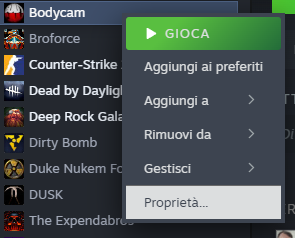
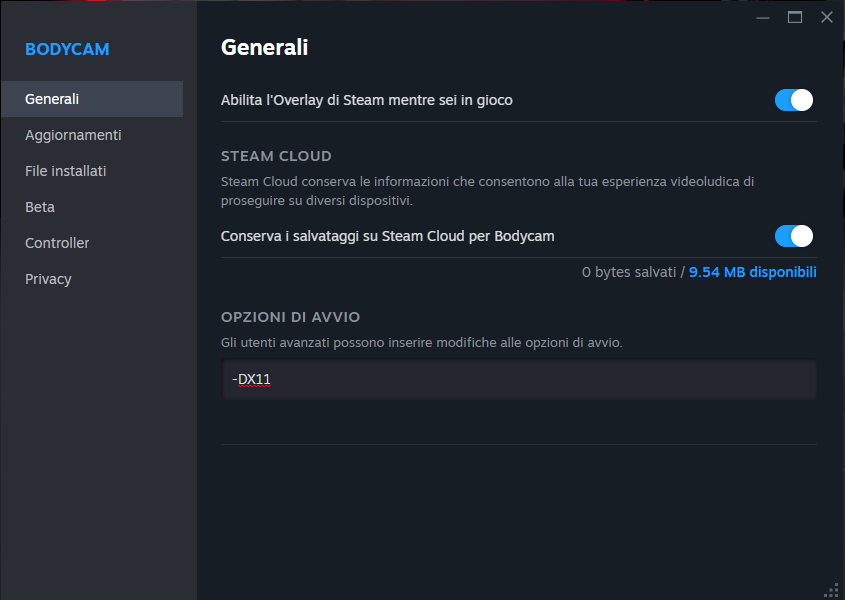
Steam/library/Bodycam/propreties/general/launch option then type -DX11
(if you want to go back to -DX12 just delete -DX11 from the launch option)
-Like this-
It disables Nanite and VSM which should help with FPS.
It gives +30 or so FPS.
(The game will DirectX 11 instead of DirectX 12, this will make the FPS more consistent and will help you with optimization a lil bit more, keep in mind that this game is not meant to be played in DX11 so in some cases it will worsen the FPS)
If you are playing on -DX11 turn SHARPNESS to MEDIUM or HIGH, otherwise keep it LOW.
IF YOU ARE HAVING A WHITE DOTS ISSUE
-Like this-
Btw you can't completely get rid of these white dots, you can minimize them tho.
Try putting amd fs3 =
QUALITY (If you have a powerful pc)
BALANCED (if you have medium power specs)
PERFORMANCE (if you have a low end pc)
-Like this-
Then put GLOBAL ILLUMINATION to MEDIUM or LOW and SHARPNESS on LOW.
-Like this-
Leave the rest of the Graphics settings high or epic and leave the GRAIN OFF and MOTION BLUR OFF (if you have a powerful pc)
My Pc spec are
---------------------------------------------
Radeon rx5700 xt sapphire nitro +
Ryzen 7 5800x
32gb DDR4 3200Mhz Corsair
---------------------------------------------
(it's a 5/6 y/o computer and when the FPS don't drop i still do 110+ on every map exept 70+ on woods so it's not my setup issue)




The secondary issues
There are a lot of bugs/quality life related issues.
i won't tell you how to fix them or work around them because the devs are slowly but surely fixing them.
I am aware that there are in game bugs like =
- Seeing trough walls
- Bullets not hitting players
- Scar whitout scope with high spread
- Resolutions for wide monitors not working
- Menu doesn't save settings
- Menu won't let you back out with ESC or right mouse
- Black screen popouts with menu overlay
- Fake rank resetting
- Fake point loss in the locker
- Hoodie Jacket bugged in-game visuals
- Guns physics when dying
- Bomb exploits
- Sound bugs when tempering with sound volumes
- Changing resolution from native one and closing the game results in a fatal error with settings reset
- Game not closing proprely staying open in background
- In-game voice chat issues
- Body parts sticking trough walls or object
AND MORE...
Obviously i understand that there are only two devs, and pretty young at that.
THIS IS WHY THESE ARE SECONDARY ISSUES NOT PRIMARY.
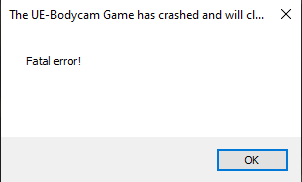
Other settings
CONTROLS
If you suffer from Motion-Sickness or after playing this game for a while you feel exausted or sick with all the camera shake or the camera movement, just easely change the CONTROLS settings to this
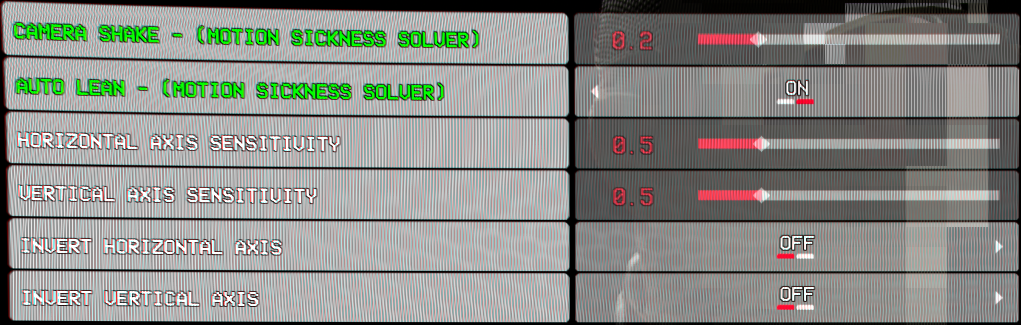
If you're not having this kind of issue then keep the camera shake low and change the sentitivity to a higher number.
Keep in mind that this game is SLOW pased, it's not meant to be a run and gun type of game, most of the times moving slowly or waiting around corners or move crouching results in less deaths and more kills.
(Best movement tip, the lowest sound cue in the game as of now is w+d/w+a crouched while aiming)
You can turn on AUTO LEAN if you do not want to keep your Q and E key pressed at all times, because [HOLD] LEAN is not present in the game at the moment.
AUDIO
For a better footstep hearing you should put sfx higher than anything else (exept gun sounds because lowering it changes little to nothing)

The other options are pretty much personal choice
Do you feel like they washed your in-game camera with soap or water effects on walls or even lightning stripes?
(this might be a solution)
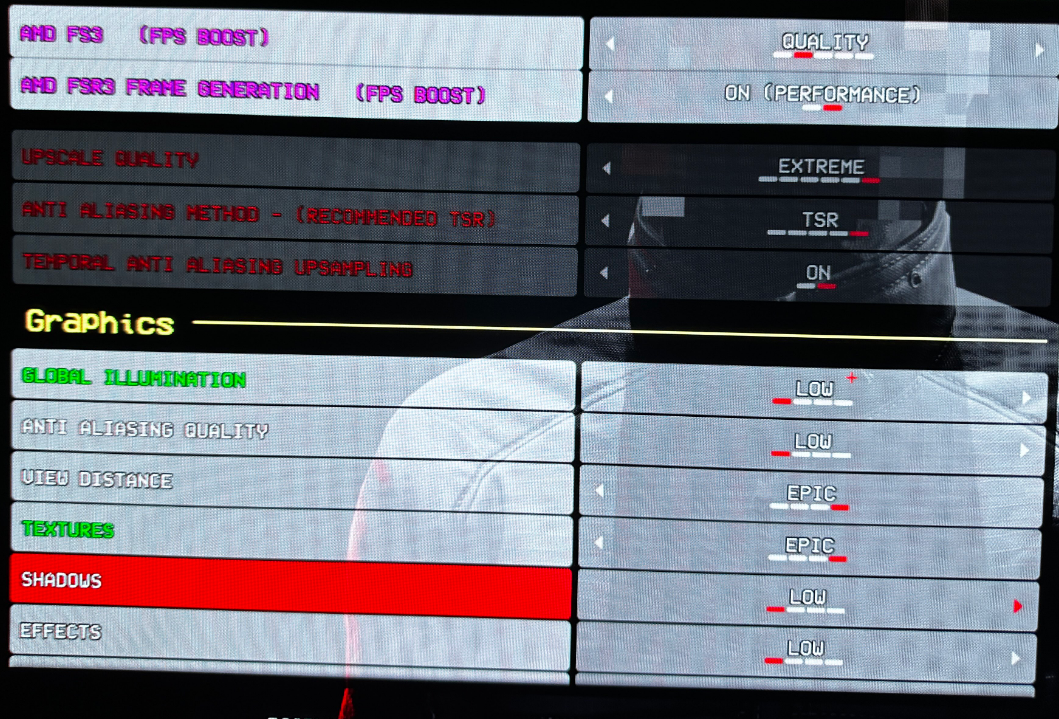
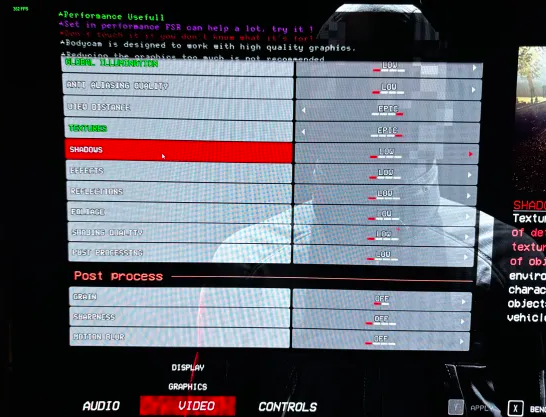
This is not a 100% fix
-UPDATES-
I got back to the game after a while and i can say that they pretty much fixed all the issues, finally i can play this game on ultra at 300+fps.
if you have specific issues you are free to ask in the comment section, if i can help you i will, otherwise maybe ppl in the comment section or online can maybe help too.
KEEP IN MIND that this guide was meant to be seen, when the game was released (because it was still full of errors and issues)
As of now this game works perfectly and it's finally optimized.